---
title: Creating Custom Fields in Jetfile
description: Follow this guide to setup custom fields that are used throughout Jetfile.
---
[Skip to content](https://knowledge.refocusai.com/configure-custom-fields-jetfile#main-content)
[More support](https://knowledge.refocusai.com/kb-tickets/new?hsLang=en) [Customer portal](https://knowledge.refocusai.com/support?hsLang=en)

- [ReFocus AI Website](https://refocusai.com)
- [Blog](https://blog.refocusai.com)
Open main navigation
Close main navigation
- [ReFocus AI Website](https://refocusai.com)
- [Blog](https://blog.refocusai.com)
- [More support](https://knowledge.refocusai.com/kb-tickets/new)
- [Customer portal](https://knowledge.refocusai.com/support)
How can we help you?
- There are no suggestions because the search field is empty.
1. [Knowledge Center](https://knowledge.refocusai.com/?hsLang=en)
2. [Integrations](https://knowledge.refocusai.com/integrations?hsLang=en)
3. [Jetfile](https://knowledge.refocusai.com/integrations?hsLang=en#jetfile)
February 20, 2024
# Creating Custom Fields in Jetfile
## Follow this guide to setup custom fields that are used throughout Jetfile.
### Adding Custom Fields
On the **Production** tab, select **Maintain▶️Custom-Field Templates**.
Ensure that in the **Fields Linked to:** drop-down window, the **Policies** option is selected.
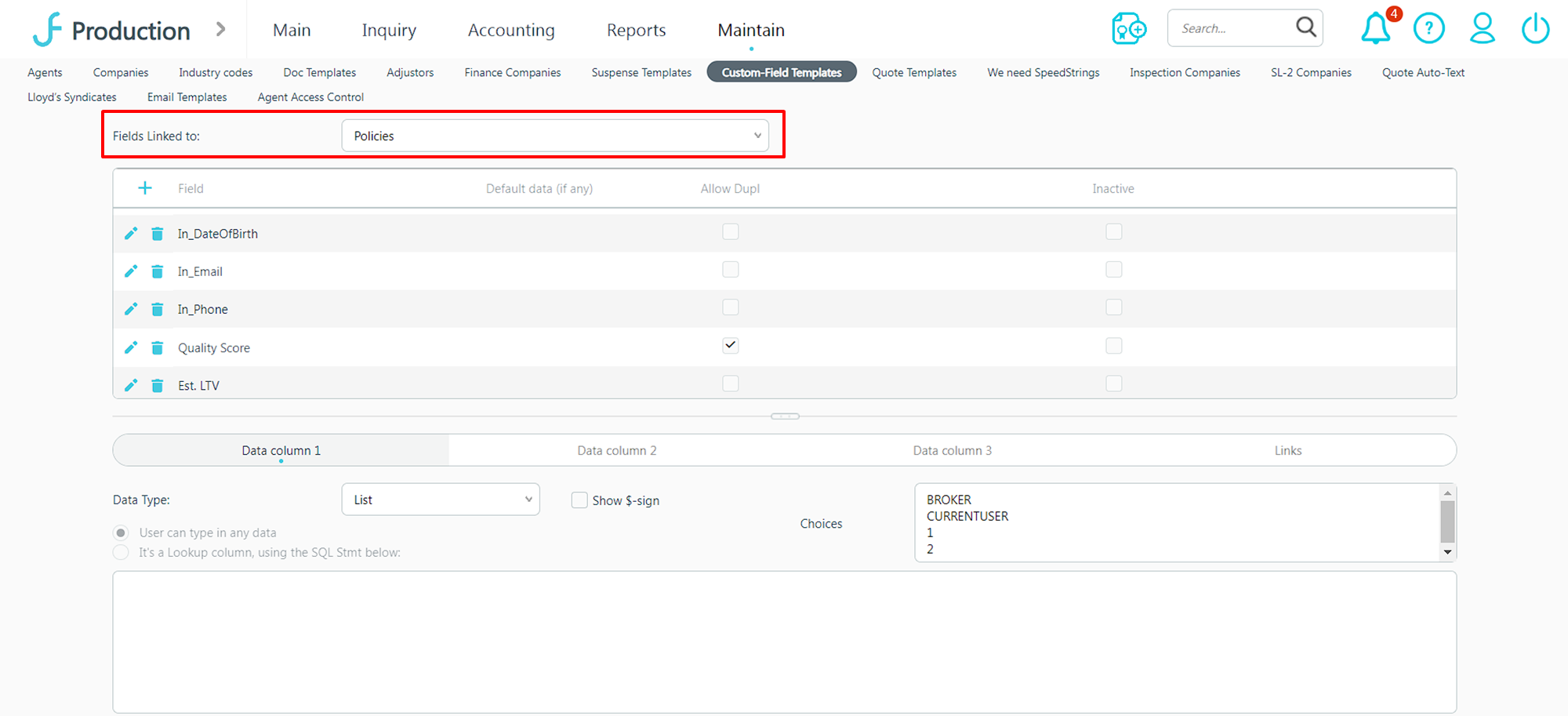
⚠️ Please enter the field names exactly as listed. Any misspellings will cause errors.
To add new custom fields, select the ➕button on the top left of the table next to **Field.**
In the window that opens, create the following fields:
- Cancellation Risk: List ▶️Yes, No
- Confidence\_Quality: List▶️ Very High, High, Medium, Low
- Quality\_Score: List▶️ Very High, High, Medium, Low
- Est\_Value: Number (ensure to check the **Show $-sign** checkbox)
- Confidence\_Quantity: Number
- Cancel\_Reason: Text
- Pred\_Date: Date
For each custom field, make sure to select the **Allow Dupl** checkbox and set the **Data Type** field accordingly.
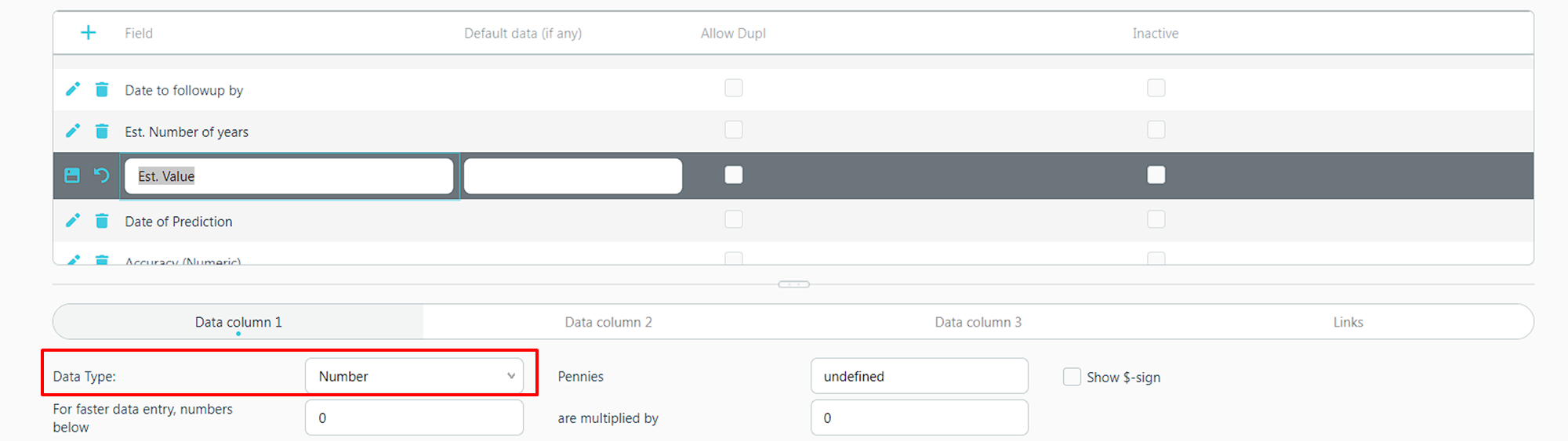
For **Data Types ▶️List**, ensure to populate the **Choices** box accordingly. After entering a new **List** option, select Enter to move down to a new row. In order for the **List** to work correctly, there can only be one option per row.
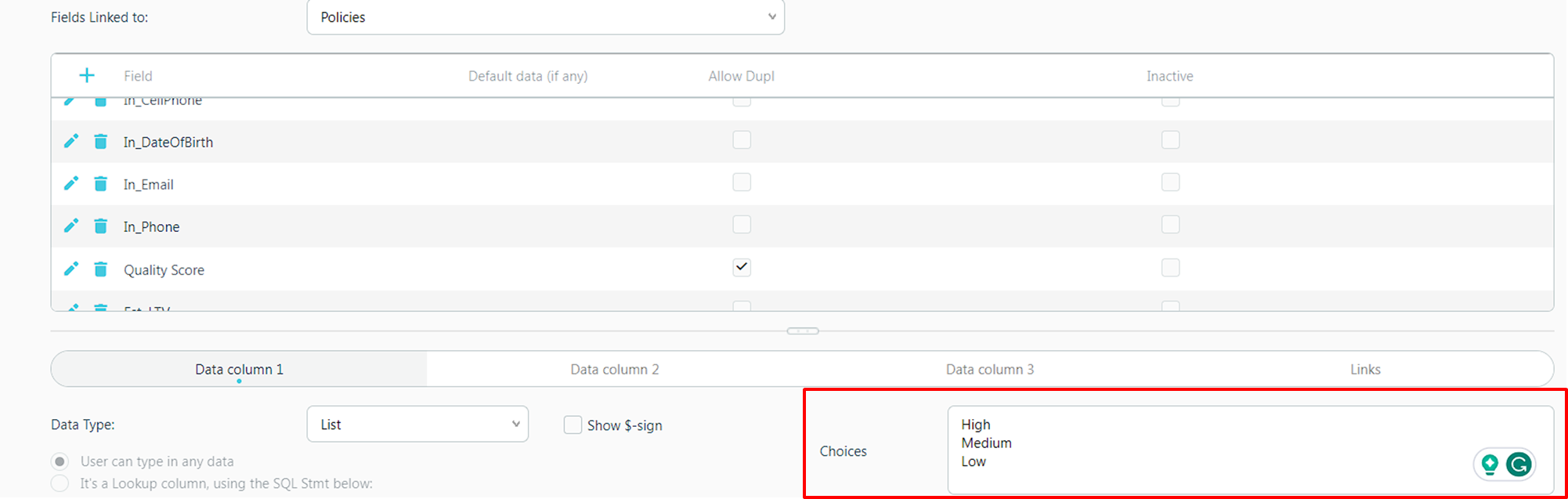
After adding each custom field, select the **Save** 💾 icon next to the **Field** name for the option you just created.
💡Jetfile does not currently have the ability to version custom fields by year. ReFocus AI will track this for you, and this information is always accessible in your web portal.
### Viewing Insights in Jetfile
Go to the **Production** tab.
From **Production**, select **Main ➡️Marketing Query➡️Accounts.** Scroll to the right to view Submission Insights.
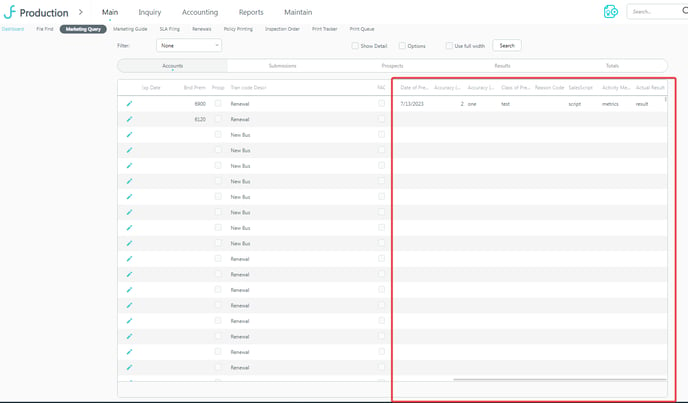
Once your company has been onboarded, Submission Insights will begin to populate the fields.
💡You can further configure how the fields appear by applying automatic sorting, color schemes, and other useful visual differentiators to surface the best submissions.
- [Onboarding](https://knowledge.refocusai.com/onboarding?hsLang=en#main-content)
- [Start Here](https://knowledge.refocusai.com/onboarding?hsLang=en#start-here)
- [Set up Carrier Access & MFA Forwarding](https://knowledge.refocusai.com/onboarding?hsLang=en#set-up-carrier-access-mfa-forwarding)
- [Account Monitoring](https://knowledge.refocusai.com/onboarding?hsLang=en#account-monitoring)
- [Remarketing](https://knowledge.refocusai.com/onboarding?hsLang=en#remarketing)
- [Data Enrichment](https://knowledge.refocusai.com/onboarding?hsLang=en#data-enrichment)
- [Risk Engineering](https://knowledge.refocusai.com/onboarding?hsLang=en#risk-engineering)
- [Installing & Using Bridge (Browser Extension)](https://knowledge.refocusai.com/onboarding?hsLang=en#installing-using-bridge-browser-extension)
- [Renewal Hub](https://knowledge.refocusai.com/onboarding?hsLang=en#renewal-hub)
- [User Access and Permissions](https://knowledge.refocusai.com/onboarding?hsLang=en#user-access-and-permissions)
- [Integrations](https://knowledge.refocusai.com/integrations?hsLang=en#main-content)
- [General](https://knowledge.refocusai.com/integrations?hsLang=en#general)
- [Jetfile](https://knowledge.refocusai.com/integrations?hsLang=en#jetfile)
- [AgencyZoom](https://knowledge.refocusai.com/integrations?hsLang=en#agencyzoom)
- [AMS360](https://knowledge.refocusai.com/integrations?hsLang=en#ams360)
- [EZLynx](https://knowledge.refocusai.com/integrations?hsLang=en#ezlynx)
- [Hawksoft](https://knowledge.refocusai.com/integrations?hsLang=en#hawksoft)
- [Salesforce](https://knowledge.refocusai.com/integrations?hsLang=en#salesforce)
- [Applied Epic](https://knowledge.refocusai.com/integrations?hsLang=en#applied-epic)
- [QQ Catalyst](https://knowledge.refocusai.com/integrations?hsLang=en#qq-catalyst)
- [MomentumAMP](https://knowledge.refocusai.com/integrations?hsLang=en#momentumamp)
- [Best Practices Guide](https://knowledge.refocusai.com/best-practices-guide?hsLang=en)
- [Release Notes](https://knowledge.refocusai.com/release-notes?hsLang=en#main-content)
- [2025](https://knowledge.refocusai.com/release-notes?hsLang=en#2025)
- [2026](https://knowledge.refocusai.com/release-notes?hsLang=en#2026)
- [Product Roadmap](https://knowledge.refocusai.com/release-notes?hsLang=en#product-roadmap)
[](http://refocusai.com)
[mailto:support@refocusai.com](mailto:support@refocusai.com)
Copyright © 2025, ReFocus AI Inc.