---
title: How to Control CLUE and MVR Reports in Automated Remarketing
description: Learn how to control CLUE and MVR reports in ReFocus AI automated remarketing, set carrier-specific rules, manage permissions, understand defaults, and know when reports can be run.
---
[Skip to content](https://knowledge.refocusai.com/control-clue-and-mvr-reports-automated-remarketing#main-content)
[More support](https://knowledge.refocusai.com/kb-tickets/new?hsLang=en) [Customer portal](https://knowledge.refocusai.com/support?hsLang=en)

- [ReFocus AI Website](https://refocusai.com)
- [Blog](https://blog.refocusai.com)
Open main navigation
Close main navigation
- [ReFocus AI Website](https://refocusai.com)
- [Blog](https://blog.refocusai.com)
- [More support](https://knowledge.refocusai.com/kb-tickets/new)
- [Customer portal](https://knowledge.refocusai.com/support)
How can we help you?
- There are no suggestions because the search field is empty.
1. [Knowledge Center](https://knowledge.refocusai.com/?hsLang=en)
2. [Onboarding](https://knowledge.refocusai.com/onboarding?hsLang=en)
3. [Risk Engineering](https://knowledge.refocusai.com/onboarding?hsLang=en#risk-engineering)
July 17, 2026
# How to Control CLUE and MVR Reports in Automated Remarketing
## ReFocus AI can run supported CLUE and Motor Vehicle Reports (MVRs) as part of the carrier quoting process. Your agency can use Risk Engineering rules to control which reports are requested and which carriers may run them.
💡**CLUE** and **MVR** reports are available for carriers on ReFocus' NextGen carrier platform.
### **What are CLUE and MVR reports?**
- **CLUE reports** provide prior insurance loss and claims history.
- **MVRs** provide information about a driver’s motor vehicle and driving record.
Carriers may use this information to determine eligibility, identify underwriting concerns, and calculate the quoted premium.
### **Who can change these settings?**
Only users with **edit access to Risk Engineering** can change your agency’s CLUE and MVR rules.
Users without edit access can view the applicable settings but cannot enable, disable, or modify them.
#### **Default settings**
ReFocus starts with the following defaults:
- CLUE reports are set to **Run** by default.
- MVRs are set to **Do not run** by default.
MVRs may create a per-report charge through the carrier. Review your agency’s carrier agreements before enabling them.
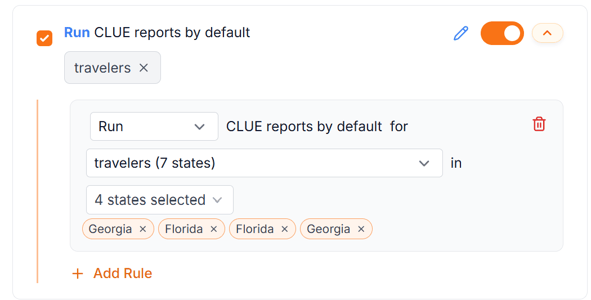
#### **How to change your report settings**
1. Open **Risk Engineering** from the left navigation bar.
2. Select the applicable line of business.
3. Open the CLUE or MVR rule.
4. Select **Run** or **Do not run**.
5. Choose the carriers the rule should apply to.
6. Save your changes.
#### **Control reports by carrier**
You do not have to use the same report setting for every carrier.
Your agency can enable CLUE reports or MVRs for selected carriers while leaving them disabled for others. This allows you to account for differences in carrier workflows, report costs, and your agency’s quoting preferences.
For example, your agency could:
- Run CLUE reports for all supported Home carriers.
- Run MVRs only for selected Auto carriers.
- Prevent a specific carrier from ordering either report.
#### **How the settings are used**
When ReFocus begins an automated remarketing quote, it checks your Risk Engineering rules for that carrier.
A report will only run when:
- The rule is set to **Run** for that carrier.
- The carrier supports the report.
- The report is available within the carrier’s quoting workflow.
- The carrier requires or allows a new report to be ordered.
A carrier may skip the report when it already has current information on file or when the report is not applicable to the quote.
### **FAQs**
**Can ReFocus run a CLUE report or MVR after a quote has been generated?**
No. ReFocus cannot order a CLUE report or MVR as a follow-up action on an existing quote.
The applicable report must be enabled before the quote is generated so that it can be ordered and used as part of the carrier’s quoting process.
**Important considerations**
Report availability varies by carrier and line of business. Enabling a rule does not guarantee that every carrier will order a report.
Quotes generated without required CLUE or MVR information may also change if the carrier later requires additional underwriting information. Your team should complete its normal review of the quote and carrier requirements before presenting coverage as final or binding a policy.
- [Onboarding](https://knowledge.refocusai.com/onboarding?hsLang=en#main-content)
- [Start Here](https://knowledge.refocusai.com/onboarding?hsLang=en#start-here)
- [Set up Carrier Access & MFA Forwarding](https://knowledge.refocusai.com/onboarding?hsLang=en#set-up-carrier-access-mfa-forwarding)
- [Account Monitoring](https://knowledge.refocusai.com/onboarding?hsLang=en#account-monitoring)
- [Remarketing](https://knowledge.refocusai.com/onboarding?hsLang=en#remarketing)
- [Data Enrichment](https://knowledge.refocusai.com/onboarding?hsLang=en#data-enrichment)
- [Risk Engineering](https://knowledge.refocusai.com/onboarding?hsLang=en#risk-engineering)
- [Installing & Using Bridge (Browser Extension)](https://knowledge.refocusai.com/onboarding?hsLang=en#installing-using-bridge-browser-extension)
- [Renewal Hub](https://knowledge.refocusai.com/onboarding?hsLang=en#renewal-hub)
- [User Access and Permissions](https://knowledge.refocusai.com/onboarding?hsLang=en#user-access-and-permissions)
- [Integrations](https://knowledge.refocusai.com/integrations?hsLang=en#main-content)
- [General](https://knowledge.refocusai.com/integrations?hsLang=en#general)
- [Jetfile](https://knowledge.refocusai.com/integrations?hsLang=en#jetfile)
- [AgencyZoom](https://knowledge.refocusai.com/integrations?hsLang=en#agencyzoom)
- [AMS360](https://knowledge.refocusai.com/integrations?hsLang=en#ams360)
- [EZLynx](https://knowledge.refocusai.com/integrations?hsLang=en#ezlynx)
- [Hawksoft](https://knowledge.refocusai.com/integrations?hsLang=en#hawksoft)
- [Salesforce](https://knowledge.refocusai.com/integrations?hsLang=en#salesforce)
- [Applied Epic](https://knowledge.refocusai.com/integrations?hsLang=en#applied-epic)
- [QQ Catalyst](https://knowledge.refocusai.com/integrations?hsLang=en#qq-catalyst)
- [MomentumAMP](https://knowledge.refocusai.com/integrations?hsLang=en#momentumamp)
- [Best Practices Guide](https://knowledge.refocusai.com/best-practices-guide?hsLang=en)
- [Release Notes](https://knowledge.refocusai.com/release-notes?hsLang=en#main-content)
- [2025](https://knowledge.refocusai.com/release-notes?hsLang=en#2025)
- [2026](https://knowledge.refocusai.com/release-notes?hsLang=en#2026)
- [Product Roadmap](https://knowledge.refocusai.com/release-notes?hsLang=en#product-roadmap)
[](http://refocusai.com)
[mailto:support@refocusai.com](mailto:support@refocusai.com)
Copyright © 2025, ReFocus AI Inc.