
Overview
ReFocus uses a primary-source and fallback-source process to retrieve Driver License information from EZLynx.
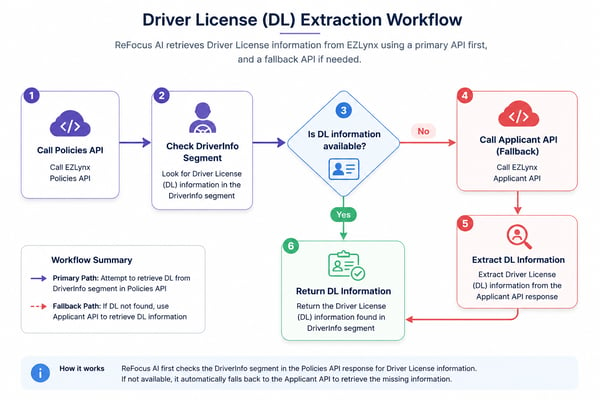
First, ReFocus checks the EZLynx Policies API. If Driver License information is available in the policy data, ReFocus uses it.
If that information is missing, ReFocus automatically checks the EZLynx Applicant API as a fallback source.
This helps ReFocus capture more complete customer data while only making additional API calls when needed.
How It Works
1. ReFocus checks the Policies API
ReFocus first retrieves policy data from the EZLynx Policies API.
2. ReFocus reviews the DriverInfo segment
ReFocus looks for Driver License information in the DriverInfo segment of the policy response.
If the Driver License information is available, ReFocus uses that value.
3. ReFocus checks the Applicant API if needed
If Driver License information is not available in the policy response, ReFocus automatically checks the EZLynx Applicant API.
4. ReFocus uses the available value
Once Driver License information is found, ReFocus uses it in quoting, remarketing, and related customer workflows.
Workflow Summary
| Step | Source | What ReFocus Does |
|---|---|---|
| 1 | EZLynx Policies API | Retrieves policy data |
| 2 | DriverInfo segment | Checks for Driver License information |
| 3 | EZLynx Applicant API | Used only if Driver License information is missing |
| 4 | ReFocus workflows | Uses the available Driver License value |
Why This Matters
This process helps ReFocus:
- Improve Driver License data completeness
- Reduce issues caused by missing EZLynx data
- Avoid unnecessary API calls
- Support more reliable quoting and remarketing workflows
Important Notes
- The Policies API is the primary source.
- The Applicant API is only used when Driver License information is missing from the policy response.
- The fallback process is automatic.
- No customer action is required.
💡Tip: If Driver License information appears in EZLynx but is not appearing in ReFocus, contact support so we can review where the value is stored and how it is being returned by EZLynx.