---
title: How to access your files during the ReFocus AI Onboarding
description: How to Access a Google Drive Folder as an Invited Editor
---
[Skip to content](https://knowledge.refocusai.com/how-to-access-your-files-during-the-refocus-ai-onboarding#main-content)
[More support](https://knowledge.refocusai.com/kb-tickets/new?hsLang=en) [Customer portal](https://knowledge.refocusai.com/support?hsLang=en)

- [ReFocus AI Website](https://refocusai.com)
- [Blog](https://blog.refocusai.com)
Open main navigation
Close main navigation
- [ReFocus AI Website](https://refocusai.com)
- [Blog](https://blog.refocusai.com)
- [More support](https://knowledge.refocusai.com/kb-tickets/new)
- [Customer portal](https://knowledge.refocusai.com/support)
How can we help you?
- There are no suggestions because the search field is empty.
1. [Knowledge Center](https://knowledge.refocusai.com/?hsLang=en)
2. [Onboarding](https://knowledge.refocusai.com/onboarding?hsLang=en)
3. [Start Here](https://knowledge.refocusai.com/onboarding?hsLang=en#start-here)
July 5, 2023
# How to access your files during the ReFocus AI Onboarding
## How to Access a Google Drive Folder as an Invited Editor
Google Drive is a cloud-based service that allows you to store and share files online. ReFocus AI uses Drive to manage and centralize document sharing. In this article, we will show you how to access a Google Drive folder as an invited editor and what to do if you encounter any problems.
**Step 1**: Check your email for an invitation link. If someone has shared a Google Drive folder with you and given you edit permission, you should receive an email from Google with a link to the folder. Click on the link to open the folder in your browser.
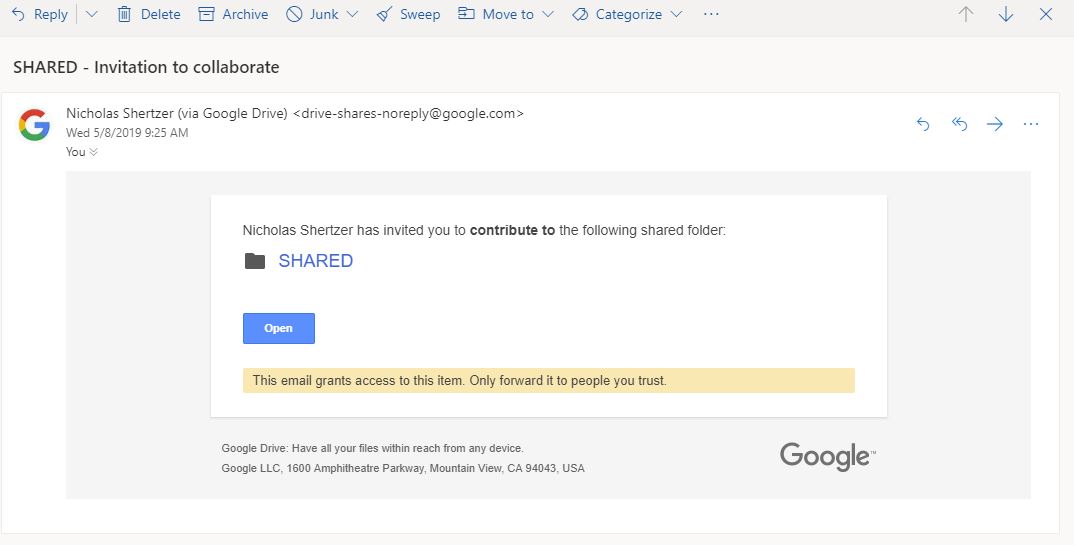
**Step 2**: Sign in to your Google account. If you are not already signed in or use another service like Microsoft, you will be prompted to sign in do so when you click on the link. Make sure you use the same email address that was used to invite you.
**Step 3**: Start editing the files in the folder. Once you are signed in, you can view and edit the files in the shared folder. You can also upload new files, create new folders, and delete files or folders that you don't need. Any changes you make will be automatically saved and synced with the owner and other collaborators.
### Troubleshooting: What if I can't access the folder?
Sometimes, you may encounter some issues when trying to access a shared Google Drive folder. Here are some possible solutions:
- Check your internet connection. Make sure you have a stable and reliable internet connection when accessing Google Drive.
- Check your email address. Make sure you are using the same email address that was used to invite you to the folder. If you have multiple email accounts, try switching to the correct one.
- Open a ticket. If the first two steps do not work, let your onboarding specialist know by opening a [support ticket](https://share.hsforms.com/1cKYQNvogQa6mk6faCaNm2Q4sbg6).
- [Onboarding](https://knowledge.refocusai.com/onboarding?hsLang=en#main-content)
- [Start Here](https://knowledge.refocusai.com/onboarding?hsLang=en#start-here)
- [Set up Carrier Access & MFA Forwarding](https://knowledge.refocusai.com/onboarding?hsLang=en#set-up-carrier-access-mfa-forwarding)
- [Account Monitoring](https://knowledge.refocusai.com/onboarding?hsLang=en#account-monitoring)
- [Remarketing](https://knowledge.refocusai.com/onboarding?hsLang=en#remarketing)
- [Data Enrichment](https://knowledge.refocusai.com/onboarding?hsLang=en#data-enrichment)
- [Risk Engineering](https://knowledge.refocusai.com/onboarding?hsLang=en#risk-engineering)
- [Installing & Using Bridge (Browser Extension)](https://knowledge.refocusai.com/onboarding?hsLang=en#installing-using-bridge-browser-extension)
- [Renewal Hub](https://knowledge.refocusai.com/onboarding?hsLang=en#renewal-hub)
- [User Access and Permissions](https://knowledge.refocusai.com/onboarding?hsLang=en#user-access-and-permissions)
- [Integrations](https://knowledge.refocusai.com/integrations?hsLang=en#main-content)
- [General](https://knowledge.refocusai.com/integrations?hsLang=en#general)
- [Jetfile](https://knowledge.refocusai.com/integrations?hsLang=en#jetfile)
- [AgencyZoom](https://knowledge.refocusai.com/integrations?hsLang=en#agencyzoom)
- [AMS360](https://knowledge.refocusai.com/integrations?hsLang=en#ams360)
- [EZLynx](https://knowledge.refocusai.com/integrations?hsLang=en#ezlynx)
- [Hawksoft](https://knowledge.refocusai.com/integrations?hsLang=en#hawksoft)
- [Salesforce](https://knowledge.refocusai.com/integrations?hsLang=en#salesforce)
- [Applied Epic](https://knowledge.refocusai.com/integrations?hsLang=en#applied-epic)
- [QQ Catalyst](https://knowledge.refocusai.com/integrations?hsLang=en#qq-catalyst)
- [MomentumAMP](https://knowledge.refocusai.com/integrations?hsLang=en#momentumamp)
- [Best Practices Guide](https://knowledge.refocusai.com/best-practices-guide?hsLang=en)
- [Release Notes](https://knowledge.refocusai.com/release-notes?hsLang=en#main-content)
- [2025](https://knowledge.refocusai.com/release-notes?hsLang=en#2025)
- [2026](https://knowledge.refocusai.com/release-notes?hsLang=en#2026)
- [Product Roadmap](https://knowledge.refocusai.com/release-notes?hsLang=en#product-roadmap)
[](http://refocusai.com)
[mailto:support@refocusai.com](mailto:support@refocusai.com)
Copyright © 2025, ReFocus AI Inc.