---
title: How to Complete Steps 4 and 5 of Onboarding
description: Learn how to finalize your account setup after completing the Agency management Data sync steps.
---
[Skip to content](https://knowledge.refocusai.com/how-to-complete-steps-4-and-5-of-onboarding#main-content)
[More support](https://knowledge.refocusai.com/kb-tickets/new?hsLang=en) [Customer portal](https://knowledge.refocusai.com/support?hsLang=en)

- [ReFocus AI Website](https://refocusai.com)
- [Blog](https://blog.refocusai.com)
Open main navigation
Close main navigation
- [ReFocus AI Website](https://refocusai.com)
- [Blog](https://blog.refocusai.com)
- [More support](https://knowledge.refocusai.com/kb-tickets/new)
- [Customer portal](https://knowledge.refocusai.com/support)
How can we help you?
- There are no suggestions because the search field is empty.
1. [Knowledge Center](https://knowledge.refocusai.com/?hsLang=en)
2. [Onboarding](https://knowledge.refocusai.com/onboarding?hsLang=en)
3. [Start Here](https://knowledge.refocusai.com/onboarding?hsLang=en#start-here)
December 19, 2025
# How to Complete Steps 4 and 5 of Onboarding
## Finalizing ReFocus Platform Setup
### **Onboarding Step 4 and 5: Data Sync Completion & Data Mapping**
Once your initial **data sync is complete**, you will receive an email notification prompting you to continue the onboarding process. At this stage, you should confirm your AMS connection, set account monitoring rules, and verify your data mapping settings.
#### **1. Confirm AMS Connection**
- Log into the ReFocus AI portal.
- Ensure your **AMS connection is active and authenticated.**
- If the connection was successfully set up, your onboarding progress will show as **Step 4 of 5.**
****
#### **2. Verify Data Mapping Rules**
### **Policy Status**
- By default, the system automatically maps to “Policy Status.”
- No changes are required unless your agency uses **custom policy statuses.**
**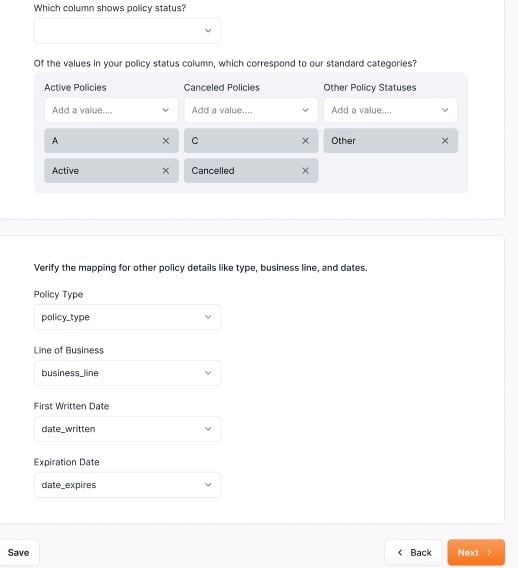**
### **Custom Policy Statuses**
- If you have custom fields in your AMS, this is where you will map them.
- Most agencies use:
- **Active**
- **Inactive**
- **Cancelled**
⚠️ Only make changes to this section if your agency uses different fields for policy statuses in your AMS.
#### **4. Filtering Options**
- In ReFocus you can pick which policy types and lines of business you want to montior for At Risk Cancellations.
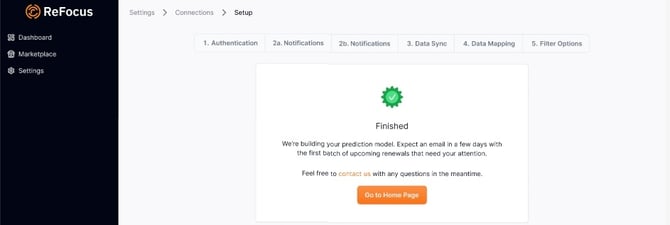
Once this step is completed you will see the following verification that everything is in process and the team is working on populating your portal.
#### **5. Next Steps:**
- Once your data mapping and filtering options are set, your agency’s accounts will begin to populate with alerts and remarketing flags when our team is finished with the data applying your rules and mapping
- Expect to see results in your dashboard within **~1 week** after completion.
✅ **Tip:** If you’re unsure about your agency’s policy statuses or custom fields, contact your **Customer Success Manager (CSM)** for guidance.
- [Onboarding](https://knowledge.refocusai.com/onboarding?hsLang=en#main-content)
- [Start Here](https://knowledge.refocusai.com/onboarding?hsLang=en#start-here)
- [Set up Carrier Access & MFA Forwarding](https://knowledge.refocusai.com/onboarding?hsLang=en#set-up-carrier-access-mfa-forwarding)
- [Account Monitoring](https://knowledge.refocusai.com/onboarding?hsLang=en#account-monitoring)
- [Remarketing](https://knowledge.refocusai.com/onboarding?hsLang=en#remarketing)
- [Data Enrichment](https://knowledge.refocusai.com/onboarding?hsLang=en#data-enrichment)
- [Risk Engineering](https://knowledge.refocusai.com/onboarding?hsLang=en#risk-engineering)
- [Installing & Using Bridge (Browser Extension)](https://knowledge.refocusai.com/onboarding?hsLang=en#installing-using-bridge-browser-extension)
- [Renewal Hub](https://knowledge.refocusai.com/onboarding?hsLang=en#renewal-hub)
- [User Access and Permissions](https://knowledge.refocusai.com/onboarding?hsLang=en#user-access-and-permissions)
- [Integrations](https://knowledge.refocusai.com/integrations?hsLang=en#main-content)
- [General](https://knowledge.refocusai.com/integrations?hsLang=en#general)
- [Jetfile](https://knowledge.refocusai.com/integrations?hsLang=en#jetfile)
- [AgencyZoom](https://knowledge.refocusai.com/integrations?hsLang=en#agencyzoom)
- [AMS360](https://knowledge.refocusai.com/integrations?hsLang=en#ams360)
- [EZLynx](https://knowledge.refocusai.com/integrations?hsLang=en#ezlynx)
- [Hawksoft](https://knowledge.refocusai.com/integrations?hsLang=en#hawksoft)
- [Salesforce](https://knowledge.refocusai.com/integrations?hsLang=en#salesforce)
- [Applied Epic](https://knowledge.refocusai.com/integrations?hsLang=en#applied-epic)
- [QQ Catalyst](https://knowledge.refocusai.com/integrations?hsLang=en#qq-catalyst)
- [MomentumAMP](https://knowledge.refocusai.com/integrations?hsLang=en#momentumamp)
- [Best Practices Guide](https://knowledge.refocusai.com/best-practices-guide?hsLang=en)
- [Release Notes](https://knowledge.refocusai.com/release-notes?hsLang=en#main-content)
- [2025](https://knowledge.refocusai.com/release-notes?hsLang=en#2025)
- [2026](https://knowledge.refocusai.com/release-notes?hsLang=en#2026)
- [Product Roadmap](https://knowledge.refocusai.com/release-notes?hsLang=en#product-roadmap)
[](http://refocusai.com)
[mailto:support@refocusai.com](mailto:support@refocusai.com)
Copyright © 2025, ReFocus AI Inc.