---
title: How to Connect ReFocus AI with Your QQ Catalyst
description: Learn how to connect QQ Catalyst to ReFocus AI by authorizing access and starting your first data sync, so you can start monitoring accounts.
---
[Skip to content](https://knowledge.refocusai.com/how-to-connect-refocus-ai-with-your-qq-catalyst#main-content)
[More support](https://knowledge.refocusai.com/kb-tickets/new?hsLang=en) [Customer portal](https://knowledge.refocusai.com/support?hsLang=en)

- [ReFocus AI Website](https://refocusai.com)
- [Blog](https://blog.refocusai.com)
Open main navigation
Close main navigation
- [ReFocus AI Website](https://refocusai.com)
- [Blog](https://blog.refocusai.com)
- [More support](https://knowledge.refocusai.com/kb-tickets/new)
- [Customer portal](https://knowledge.refocusai.com/support)
How can we help you?
- There are no suggestions because the search field is empty.
1. [Knowledge Center](https://knowledge.refocusai.com/?hsLang=en)
2. [Integrations](https://knowledge.refocusai.com/integrations?hsLang=en)
3. [QQ Catalyst](https://knowledge.refocusai.com/integrations?hsLang=en#qq-catalyst)
October 26, 2026
# How to Connect ReFocus AI with Your QQ Catalyst
## Connecting ReFocus AI to your QQ Catalyst system takes a short setup in QQ Catalyst and in the ReFocus AI platform, followed by an automated data sync that prepares your account for onboarding.
This guide walks you through each step so you can start using ReFocus AI's remarketing and account monitoring capabilities.
#### **Step 1: Authorize ReFocus AI in QQ Catalyst**
1. In QQ Catalyst, authorize ReFocus AI to access your agency data. Follow the video guide: [How to connect QQ Catalyst to ReFocus](https://knowledge.refocusai.com/how-to-connect-qq-catalyst-to-refocus?hsLang=en).
#### **Step 2: Connect QQ Catalyst in ReFocus AI**
1. In a browser tab, go to the [ReFocus AI Platform](https://app.refocusai.com/auth/register) and **create an account** if you do not already have one.
2. Once logged in, navigate to:
**Settings → AMS → Select QQ Catalyst**
3. Complete the authentication to connect QQ Catalyst to ReFocus AI and start the sync.
#### **Step 3: Set Monitoring Timeframes**
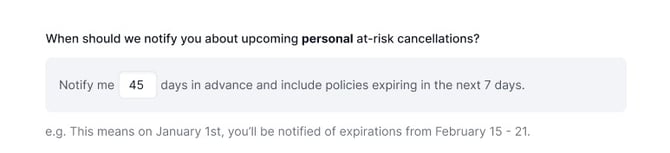
ReFocus AI lets you set how far in advance you want to begin monitoring accounts for remarketing opportunities:
- **Personal Lines:** Typically **45 to 60 days** before renewal
- **Commercial Lines:** Typically **90 to 120 days** before renewal
Adjust these settings based on your agency's workflow preferences.
#### **Step 4: Initial Data Sync**
Once your settings are saved, ReFocus AI begins syncing your data from QQ Catalyst.
- **Sync duration:** Typically **4 to 5 days**
- You receive an **email notification** when the sync is complete, inviting you to continue the onboarding process inside the ReFocus AI portal.
#### **Step 5: Data Mapping in ReFocus AI**
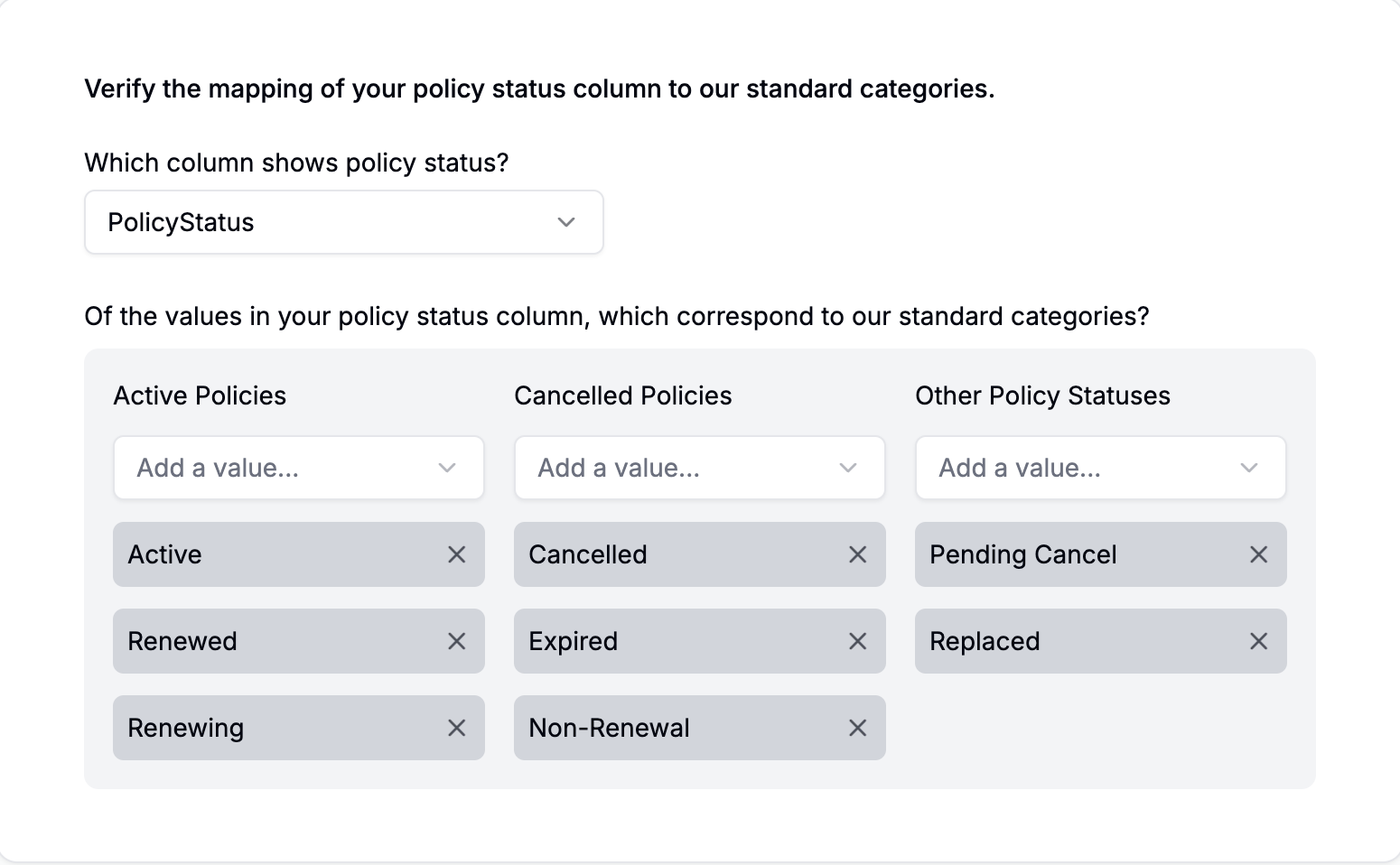
Before you can use the full capabilities of ReFocus AI, you complete a **short data mapping exercise**:
- Map data such as **Active Policies** to the correct fields in ReFocus AI.
- If you have any questions, your **Customer Success Manager (CSM)** can walk you through the process.
#### **Step 6: Start Seeing Results**
Within about **one week** of completing data mapping, you begin to see:
- At-risk accounts flagged for review
- All of your renewals within a 60-day window, with the option to remarket these policies
Your team can then work more efficiently, focus on higher-value client interactions, and service more accounts in less time.
**Tip:** For the best results, review your monitoring timeframes quarterly and adjust them based on market conditions, carrier changes, and renewal trends.
- [Onboarding](https://knowledge.refocusai.com/onboarding?hsLang=en#main-content)
- [Start Here](https://knowledge.refocusai.com/onboarding?hsLang=en#start-here)
- [Set up Carrier Access & MFA Forwarding](https://knowledge.refocusai.com/onboarding?hsLang=en#set-up-carrier-access-mfa-forwarding)
- [Account Monitoring](https://knowledge.refocusai.com/onboarding?hsLang=en#account-monitoring)
- [Remarketing](https://knowledge.refocusai.com/onboarding?hsLang=en#remarketing)
- [Data Enrichment](https://knowledge.refocusai.com/onboarding?hsLang=en#data-enrichment)
- [Risk Engineering](https://knowledge.refocusai.com/onboarding?hsLang=en#risk-engineering)
- [Installing & Using Bridge (Browser Extension)](https://knowledge.refocusai.com/onboarding?hsLang=en#installing-using-bridge-browser-extension)
- [Renewal Hub](https://knowledge.refocusai.com/onboarding?hsLang=en#renewal-hub)
- [User Access and Permissions](https://knowledge.refocusai.com/onboarding?hsLang=en#user-access-and-permissions)
- [Integrations](https://knowledge.refocusai.com/integrations?hsLang=en#main-content)
- [General](https://knowledge.refocusai.com/integrations?hsLang=en#general)
- [Jetfile](https://knowledge.refocusai.com/integrations?hsLang=en#jetfile)
- [AgencyZoom](https://knowledge.refocusai.com/integrations?hsLang=en#agencyzoom)
- [AMS360](https://knowledge.refocusai.com/integrations?hsLang=en#ams360)
- [EZLynx](https://knowledge.refocusai.com/integrations?hsLang=en#ezlynx)
- [Hawksoft](https://knowledge.refocusai.com/integrations?hsLang=en#hawksoft)
- [Salesforce](https://knowledge.refocusai.com/integrations?hsLang=en#salesforce)
- [Applied Epic](https://knowledge.refocusai.com/integrations?hsLang=en#applied-epic)
- [QQ Catalyst](https://knowledge.refocusai.com/integrations?hsLang=en#qq-catalyst)
- [MomentumAMP](https://knowledge.refocusai.com/integrations?hsLang=en#momentumamp)
- [Best Practices Guide](https://knowledge.refocusai.com/best-practices-guide?hsLang=en)
- [Release Notes](https://knowledge.refocusai.com/release-notes?hsLang=en#main-content)
- [2025](https://knowledge.refocusai.com/release-notes?hsLang=en#2025)
- [2026](https://knowledge.refocusai.com/release-notes?hsLang=en#2026)
- [Product Roadmap](https://knowledge.refocusai.com/release-notes?hsLang=en#product-roadmap)
[](http://refocusai.com)
[mailto:support@refocusai.com](mailto:support@refocusai.com)
Copyright © 2025, ReFocus AI Inc.