---
title: "Step 1: How to find your EZLynx organization ID?"
description: Find your organization ID and enter it during onboarding to connect ReFocus to EZLynx
---
[Skip to content](https://knowledge.refocusai.com/how-to-find-your-ezlynx-organization-id#main-content)
[More support](https://knowledge.refocusai.com/kb-tickets/new?hsLang=en) [Customer portal](https://knowledge.refocusai.com/support?hsLang=en)

- [ReFocus AI Website](https://refocusai.com)
- [Blog](https://blog.refocusai.com)
Open main navigation
Close main navigation
- [ReFocus AI Website](https://refocusai.com)
- [Blog](https://blog.refocusai.com)
- [More support](https://knowledge.refocusai.com/kb-tickets/new)
- [Customer portal](https://knowledge.refocusai.com/support)
How can we help you?
- There are no suggestions because the search field is empty.
1. [Knowledge Center](https://knowledge.refocusai.com/?hsLang=en)
2. [Integrations](https://knowledge.refocusai.com/integrations?hsLang=en)
3. [EZLynx](https://knowledge.refocusai.com/integrations?hsLang=en#ezlynx)
March 2, 2026
# Step 1: How to find your EZLynx organization ID?
## Find your organization ID and enter it during onboarding to connect ReFocus to EZLynx
1\. Click on the Admin icon in the EZLynx left sidebar

2\. Click on the invoices tab
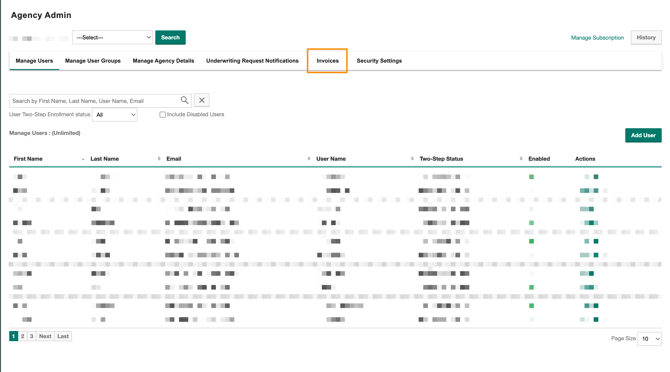
3\. Open any invoice and find the **Organization** or **Customer ID**
### **Continue onboarding**
Now that you have identified your EZLynx Organization ID, continue onboarding with the next article in the series:
[Step 2: How to Set Up EZLynx Credentials + MFA Forwarding](https://knowledge.refocusai.com/e3t/Ctc/RI+50013/cZ34P04/Jll2-6qcW7Y8-PT6lZ3kSW8V8QlM6gNcGyW58ym2l69dJNvW3DWTRQ8yDHflW5wQRJc8Xf94NW6Kt17c4hGms-W98DkMn8FBGs1W7_p_pP5H16z1MjfRbRjXdLcW6fsgRz274Qs1W6FvX4q12yMmtF2qpLhVyVmSW6Yt9-M3slDKnN6Fs4w5dGnYmW2Z6McM7JQyflW2QZrL-1QsGfqW1RfSJj2C4cP1N6rh9_TDGyJ4W7LpkVC6xFVrQW34nTgg16-FZwW4vJbf32hYgNnW3QWNg84yh3DPW95s-807sX7JfW4gYwmc2dJ12nW2wRrmL7NXn8FV2jqf4938pbVW12fKRb1lmVM7f8lqFz-04?hsLang=en)
- [Onboarding](https://knowledge.refocusai.com/onboarding?hsLang=en#main-content)
- [Start Here](https://knowledge.refocusai.com/onboarding?hsLang=en#start-here)
- [Set up Carrier Access & MFA Forwarding](https://knowledge.refocusai.com/onboarding?hsLang=en#set-up-carrier-access-mfa-forwarding)
- [Account Monitoring](https://knowledge.refocusai.com/onboarding?hsLang=en#account-monitoring)
- [Remarketing](https://knowledge.refocusai.com/onboarding?hsLang=en#remarketing)
- [Data Enrichment](https://knowledge.refocusai.com/onboarding?hsLang=en#data-enrichment)
- [Risk Engineering](https://knowledge.refocusai.com/onboarding?hsLang=en#risk-engineering)
- [Installing & Using Bridge (Browser Extension)](https://knowledge.refocusai.com/onboarding?hsLang=en#installing-using-bridge-browser-extension)
- [Renewal Hub](https://knowledge.refocusai.com/onboarding?hsLang=en#renewal-hub)
- [User Access and Permissions](https://knowledge.refocusai.com/onboarding?hsLang=en#user-access-and-permissions)
- [Integrations](https://knowledge.refocusai.com/integrations?hsLang=en#main-content)
- [General](https://knowledge.refocusai.com/integrations?hsLang=en#general)
- [Jetfile](https://knowledge.refocusai.com/integrations?hsLang=en#jetfile)
- [AgencyZoom](https://knowledge.refocusai.com/integrations?hsLang=en#agencyzoom)
- [AMS360](https://knowledge.refocusai.com/integrations?hsLang=en#ams360)
- [EZLynx](https://knowledge.refocusai.com/integrations?hsLang=en#ezlynx)
- [Hawksoft](https://knowledge.refocusai.com/integrations?hsLang=en#hawksoft)
- [Salesforce](https://knowledge.refocusai.com/integrations?hsLang=en#salesforce)
- [Applied Epic](https://knowledge.refocusai.com/integrations?hsLang=en#applied-epic)
- [QQ Catalyst](https://knowledge.refocusai.com/integrations?hsLang=en#qq-catalyst)
- [MomentumAMP](https://knowledge.refocusai.com/integrations?hsLang=en#momentumamp)
- [Best Practices Guide](https://knowledge.refocusai.com/best-practices-guide?hsLang=en)
- [Release Notes](https://knowledge.refocusai.com/release-notes?hsLang=en#main-content)
- [2025](https://knowledge.refocusai.com/release-notes?hsLang=en#2025)
- [2026](https://knowledge.refocusai.com/release-notes?hsLang=en#2026)
- [Product Roadmap](https://knowledge.refocusai.com/release-notes?hsLang=en#product-roadmap)
[](http://refocusai.com)
[mailto:support@refocusai.com](mailto:support@refocusai.com)
Copyright © 2025, ReFocus AI Inc.