---
title: How to integrate with AMS360
description: ReFocus AI has a robust integration with AMS360 which creates suspenses when a retention opportunity is discovered.
---
[Skip to content](https://knowledge.refocusai.com/how-to-integrate-with-ams360#main-content)
[More support](https://knowledge.refocusai.com/kb-tickets/new?hsLang=en) [Customer portal](https://knowledge.refocusai.com/support?hsLang=en)

- [ReFocus AI Website](https://refocusai.com)
- [Blog](https://blog.refocusai.com)
Open main navigation
Close main navigation
- [ReFocus AI Website](https://refocusai.com)
- [Blog](https://blog.refocusai.com)
- [More support](https://knowledge.refocusai.com/kb-tickets/new)
- [Customer portal](https://knowledge.refocusai.com/support)
How can we help you?
- There are no suggestions because the search field is empty.
1. [Knowledge Center](https://knowledge.refocusai.com/?hsLang=en)
2. [Integrations](https://knowledge.refocusai.com/integrations?hsLang=en)
3. [AMS360](https://knowledge.refocusai.com/integrations?hsLang=en#ams360)
May 28, 2026
# How to integrate with AMS360
## ReFocus AI has a robust integration with AMS360 which creates suspenses when a retention opportunity is discovered.
💡Please note that the AMS360 Agency Administrator must complete the following steps.
#### This video provides a quick walkthrough on navigating to WSAPI and EMS.
### Step 1
As the AMS360 Agency Administrator, login to AMS360 ([https://www.ams360.com](https://www.ams360.com)).
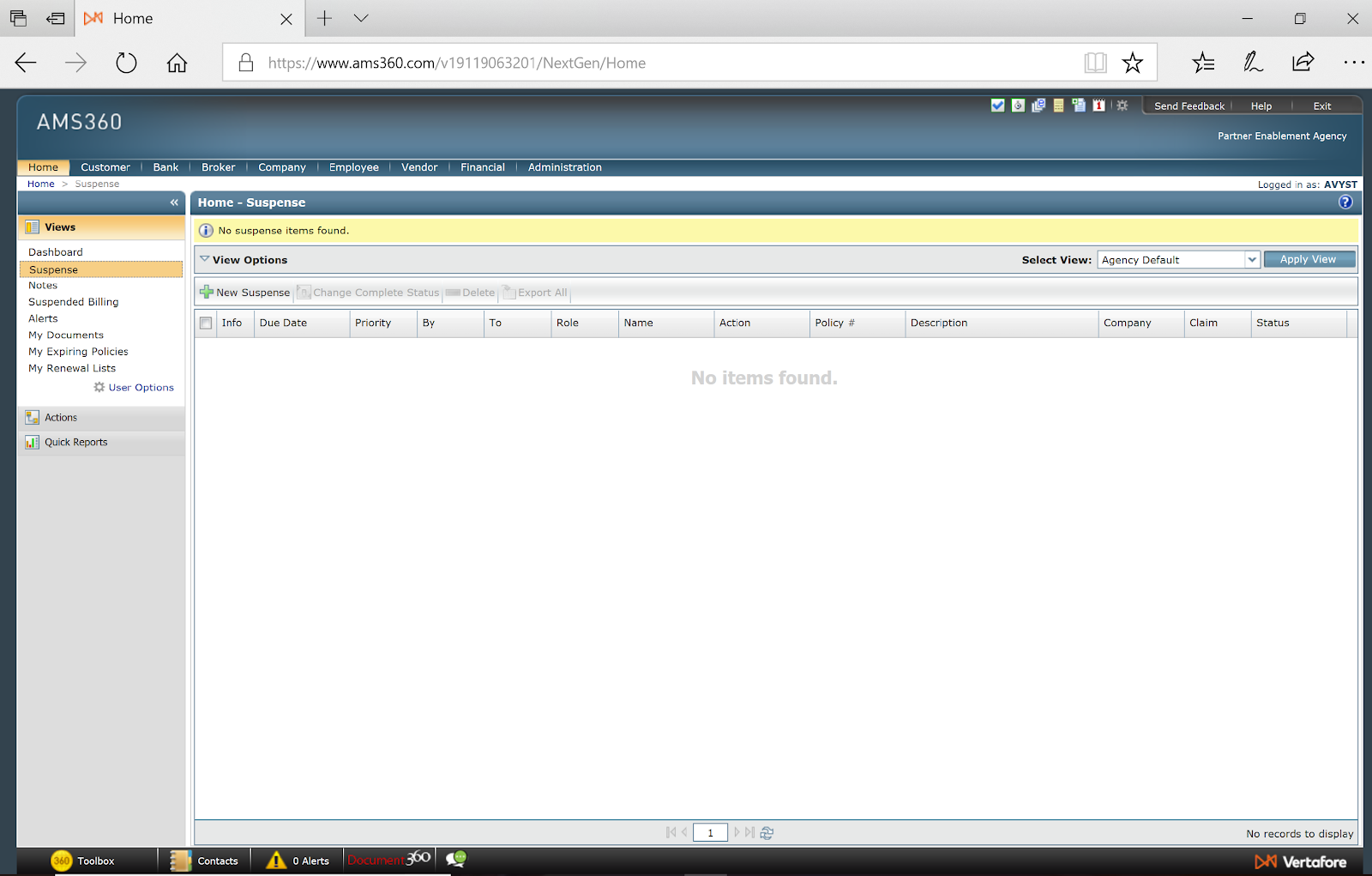
You can only access AMS360 from a Microsoft Windows 10 or later computer. If you still need to, please download the desktop client during your initial login to AMS360. You can access AMS360 from the following browsers (all other operating systems or browsers are not supported):
- Internet Explorer (IE) 11
- Microsoft Edge
- Google Chrome
### Step 2
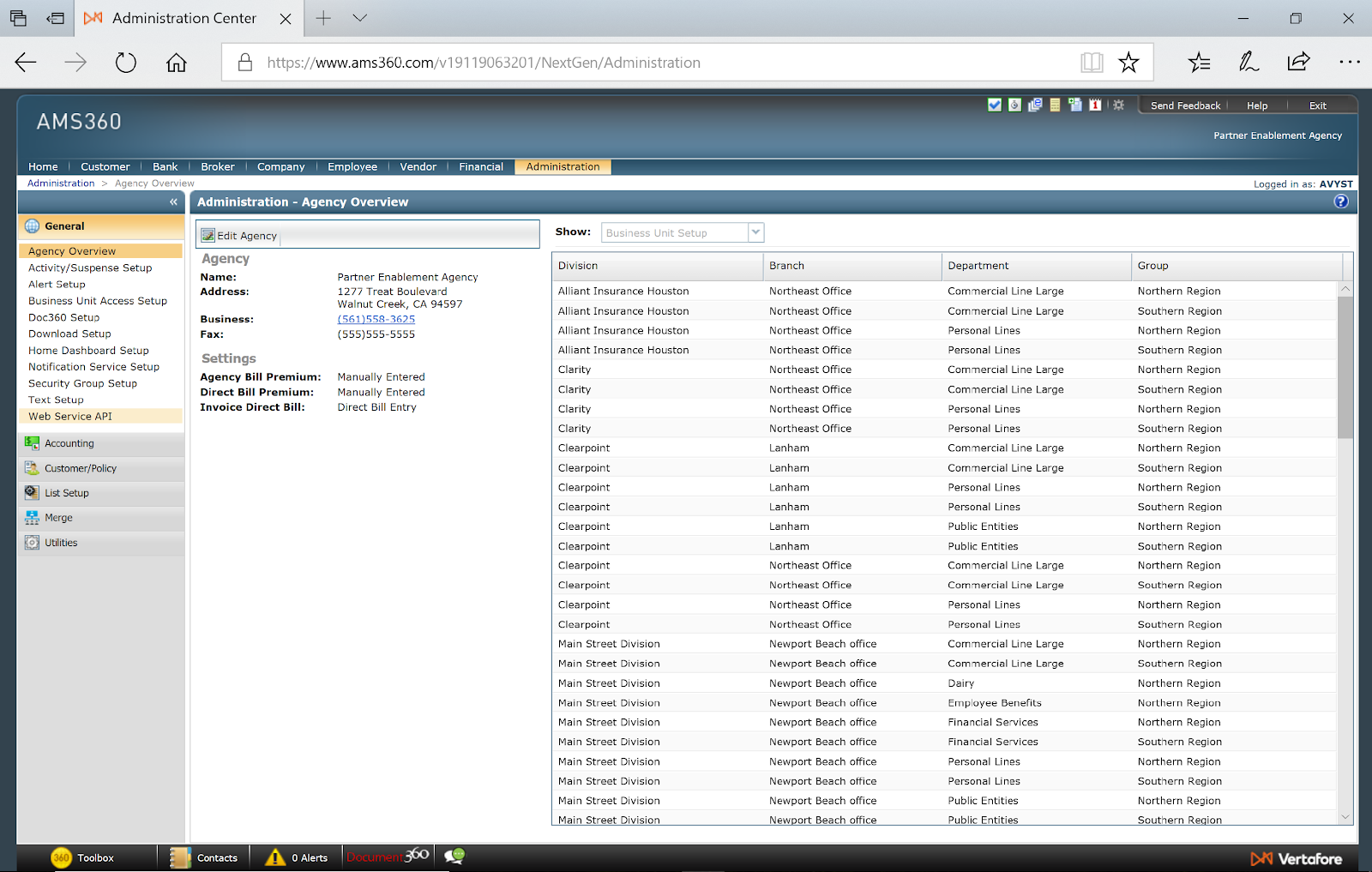
Once successfully logged in, on the top navigation bar, select **Administration.**
****
#### Provide Agency Number
Please provide your AMS360 Agency Number to your onboarding specialist. If you need help locating it, [check out this article from Vertafore on managing your agency](https://help.vertafore.com/salestrackclassic/content/getstarted/agencyinformation.htm).
#### Configure EMS Agency Key
In **Administration**, navigate to the left side **General ➡️** **Application Catalog.**
**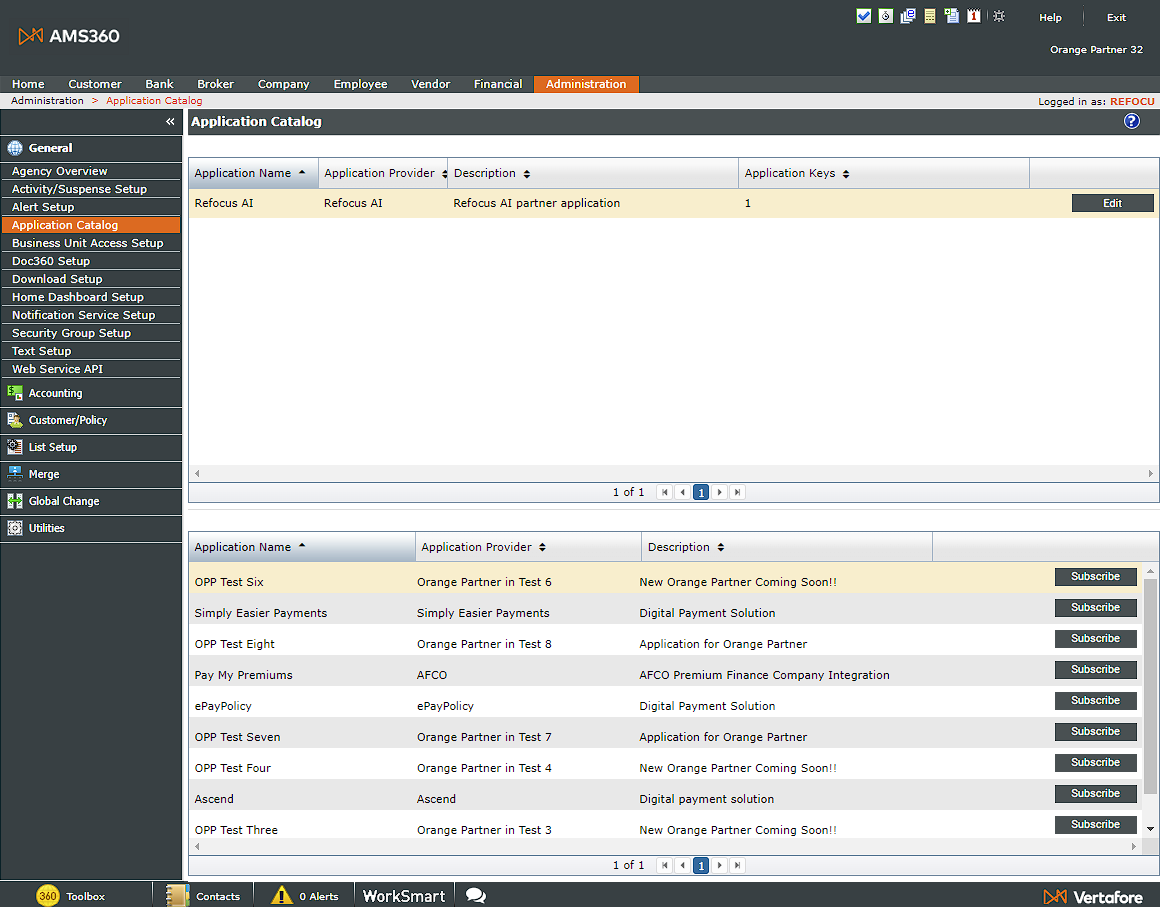**
When you initially load the **Application Catalog**, the top window will not show the ReFocus AI integration. You must search for it in the bottom window and select **Subscribe**.
Once you have subscribed, click the **Edit** button next to the ReFocus AI integration.
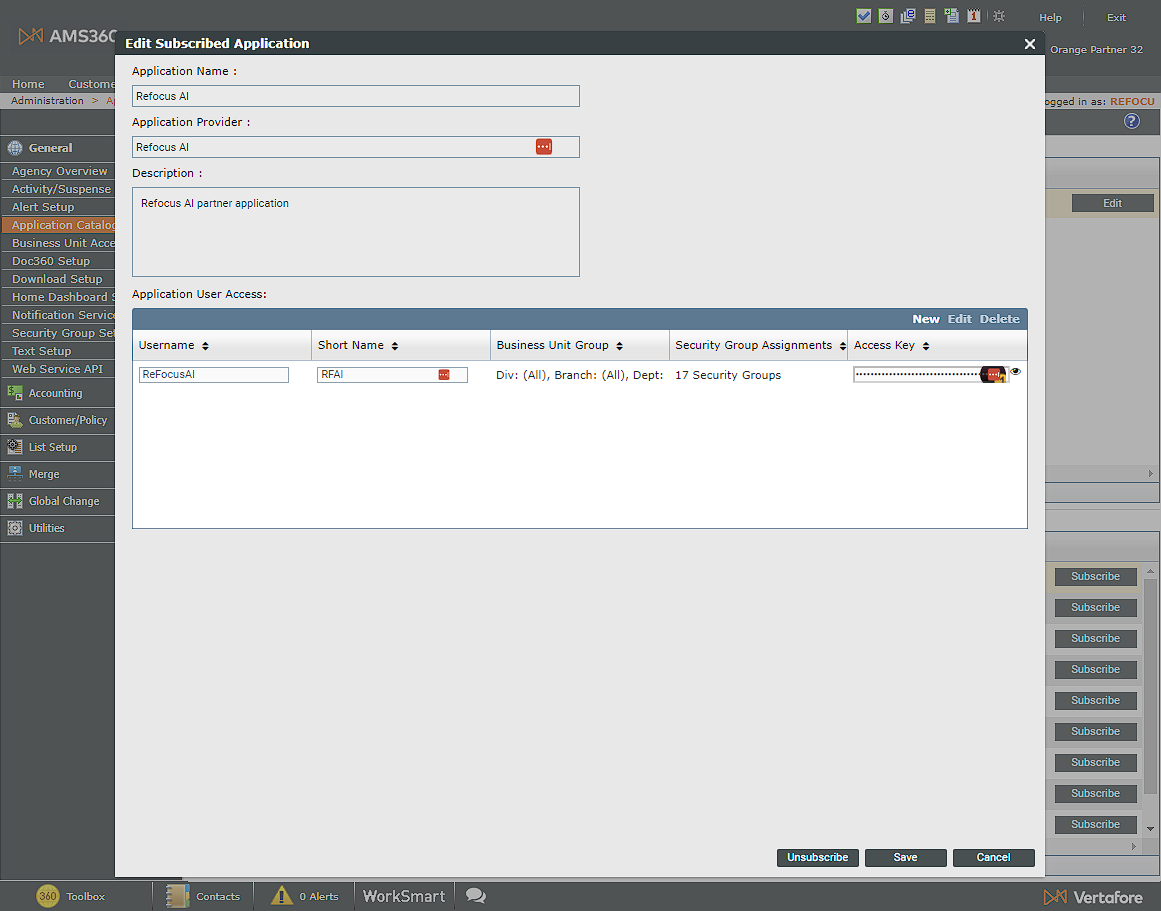
You can now provision access for the ReFocus AI integration.
Select **New** in the **Application User Access** screen. For credentials, we recommend using:
- Username: ReFocusAI
- Short Name: RFAI
- Business Unit Group ➡️Select a Business Unit Drop Down: Select the first option for **All.** 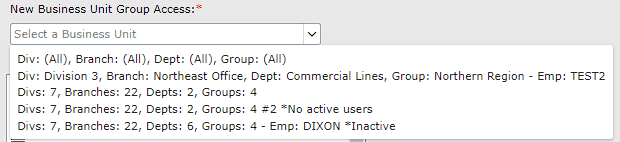
- Security Group Assignments: Select All
Select **Add** in the **Application User Access** screen to save.
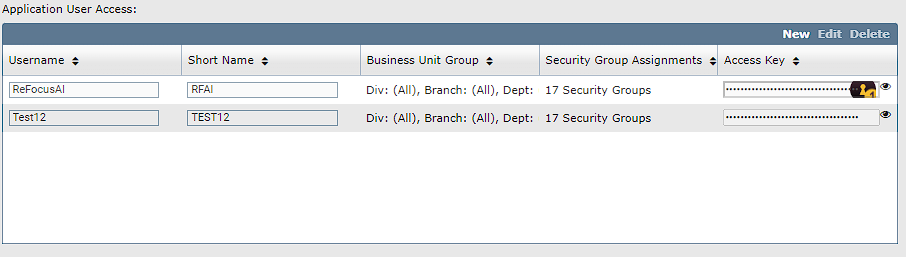
Once you have saved, select the 👁️to view and copy the **Access Key**. Please provide this to your onboarding specialist.
#### Configure Web Services API Account
In **Administration**, navigate to the left side **General ➡️** **Web Service API.**

When the following screen loads, select **Add** to create a connection to the new web service.
For credentials, please use the following:
- WSAPI Login ID: REFOCUSAI\_\[Your company name\]
- Password: Create a secure password and provide it to your onboarding specialist
💡If you need to use an abbreviation for your company so that your Login ID is within character limits, please provide it to your onboarding specialist. An example is shortening TheBestBrokerage to REFOCUSAI\_TBB.
Select the box under data security for **Entity Access Security Only**.
Under Entity Access, select **Check All**.

Once you have configured the system, select the **Save** icon to complete the WSAPI setup.

#### Create Custom Action for Activities
ReFocus AI uses Custom Actions as an activity code so reports can be run within AMS360 on the suspenses the integration creates.
In **Administration**, navigate to the left side **General ➡️** **Activity/Suspense Setup.**
💡 To access **Profile Questions**, the AMS360 application must be installed on your computer.
In the window that opens, select **New** from the **Actions** section.

Ensure **Active** is selected. In the **Action** field, type in zzzReFocusAI. Leave **Checkpoints** as is.
Select the **Save** 💾 icon. You can now close the window.
⚠️ If **Save 💾** is not selected before closing the window, the new questions will be lost, and you will need to start over.
#### Create Profile Questions
Custom profile questions enable administrators to run reports with additional information on created suspenses.
In **Administration**, navigate to the left side **General ➡️** **Customer/Policy➡️Profile Questions.**
💡 To access **Profile Questions**, the AMS360 application must be installed on your computer.
In the window that opens, select **New** from the **Profile Questions** section.
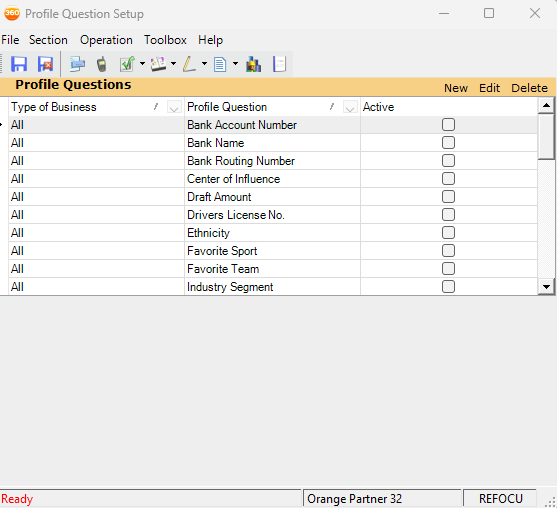
Ensure the **Type of Business** is set to **All** and the **Active** is selected.
Create the following profile questions. Put the name in **Text** and set **Answer** to the corresponding drop-down option.
After adding each question, select **Add**.
- Cancellation Risk: Yes/No
- Confidence\_Quality: Text ▶️ Very High, High, Medium, Low
- Confidence\_Quantity: Number
- Cancel\_reason\_expct: Text
- Date of prediction: Date
Once all the questions have been added, select the **Save** 💾 icon. You can now close the window.
🔔Please make sure to double-check that the right data type has been selected for each custom profile question. Once saved, custom profile questions can not be changed or deleted.
⚠️ If **Save 💾** is not selected before closing the window, the new questions will be lost, and you will need to start over.
### Step 3
Log in or [register for a ReFocus account](https://knowledge.refocusai.com/how-to-add-a-new-user-to-your-refocus-ai-account?hsLang=en).
Navigate to **Settings \> AMS \> Select AMS360** from the available options.
Enter your WSAPI and EMS credentials.
Select **Next** to finish onboarding.
---
You have successfully configured AMS360 to work with ReFocus AI 🎉
-png.png)
This is what suspenses will look like when they are created through the ReFocus AI integration.
- [Onboarding](https://knowledge.refocusai.com/onboarding?hsLang=en#main-content)
- [Start Here](https://knowledge.refocusai.com/onboarding?hsLang=en#start-here)
- [Set up Carrier Access & MFA Forwarding](https://knowledge.refocusai.com/onboarding?hsLang=en#set-up-carrier-access-mfa-forwarding)
- [Account Monitoring](https://knowledge.refocusai.com/onboarding?hsLang=en#account-monitoring)
- [Remarketing](https://knowledge.refocusai.com/onboarding?hsLang=en#remarketing)
- [Data Enrichment](https://knowledge.refocusai.com/onboarding?hsLang=en#data-enrichment)
- [Risk Engineering](https://knowledge.refocusai.com/onboarding?hsLang=en#risk-engineering)
- [Installing & Using Bridge (Browser Extension)](https://knowledge.refocusai.com/onboarding?hsLang=en#installing-using-bridge-browser-extension)
- [Renewal Hub](https://knowledge.refocusai.com/onboarding?hsLang=en#renewal-hub)
- [User Access and Permissions](https://knowledge.refocusai.com/onboarding?hsLang=en#user-access-and-permissions)
- [Integrations](https://knowledge.refocusai.com/integrations?hsLang=en#main-content)
- [General](https://knowledge.refocusai.com/integrations?hsLang=en#general)
- [Jetfile](https://knowledge.refocusai.com/integrations?hsLang=en#jetfile)
- [AgencyZoom](https://knowledge.refocusai.com/integrations?hsLang=en#agencyzoom)
- [AMS360](https://knowledge.refocusai.com/integrations?hsLang=en#ams360)
- [EZLynx](https://knowledge.refocusai.com/integrations?hsLang=en#ezlynx)
- [Hawksoft](https://knowledge.refocusai.com/integrations?hsLang=en#hawksoft)
- [Salesforce](https://knowledge.refocusai.com/integrations?hsLang=en#salesforce)
- [Applied Epic](https://knowledge.refocusai.com/integrations?hsLang=en#applied-epic)
- [QQ Catalyst](https://knowledge.refocusai.com/integrations?hsLang=en#qq-catalyst)
- [MomentumAMP](https://knowledge.refocusai.com/integrations?hsLang=en#momentumamp)
- [Best Practices Guide](https://knowledge.refocusai.com/best-practices-guide?hsLang=en)
- [Release Notes](https://knowledge.refocusai.com/release-notes?hsLang=en#main-content)
- [2025](https://knowledge.refocusai.com/release-notes?hsLang=en#2025)
- [2026](https://knowledge.refocusai.com/release-notes?hsLang=en#2026)
- [Product Roadmap](https://knowledge.refocusai.com/release-notes?hsLang=en#product-roadmap)
[](http://refocusai.com)
[mailto:support@refocusai.com](mailto:support@refocusai.com)
Copyright © 2025, ReFocus AI Inc.