---
title: How to integrate with the Salesforce API
description: How to configure the Salesforce API to integrate with RerFocus AI.
---
[Skip to content](https://knowledge.refocusai.com/how-to-integrate-with-the-salesforce-api#main-content)
[More support](https://knowledge.refocusai.com/kb-tickets/new?hsLang=en) [Customer portal](https://knowledge.refocusai.com/support?hsLang=en)

- [ReFocus AI Website](https://refocusai.com)
- [Blog](https://blog.refocusai.com)
Open main navigation
Close main navigation
- [ReFocus AI Website](https://refocusai.com)
- [Blog](https://blog.refocusai.com)
- [More support](https://knowledge.refocusai.com/kb-tickets/new)
- [Customer portal](https://knowledge.refocusai.com/support)
How can we help you?
- There are no suggestions because the search field is empty.
1. [Knowledge Center](https://knowledge.refocusai.com/?hsLang=en)
2. [Integrations](https://knowledge.refocusai.com/integrations?hsLang=en)
3. [Salesforce](https://knowledge.refocusai.com/integrations?hsLang=en#salesforce)
November 15, 2024
# How to integrate with the Salesforce API
## Instructions for Salesforce API
ReFocus AI has a robust integration with native Salesforce and 3rd party applications built on Salesforce.
- Veruna
- Neon
- [Applied Epic for Salesforce](https://www1.appliedsystems.com/en-us/solutions/for-agents/sales-marketing-automation/applied-epic-for-salesforce/)
- [Novidea](https://www.novideasoft.com/en-us/)
### **Step 1**
To provide access to your Salesforce environment, start by provisioning API access ([link to instructions](https://medium.com/@tou_sfdx/salesforce-rest-api-tutorial-3bcd39e493f6)). For the connected application name, provide something descriptive. This can be your organization's name, followed by additional details.
Example: \[\*Org name\*\]\_ReFocusAI\_API
### **Step 2**
The next step is to create an API-only user and provide that user access to the API you just created ([link to instructions](https://help.salesscreen.wiki/en/articles/22052-how-do-i-create-an-api-integration-user-in-salesforce)). Please use [support@refocusai.com](mailto:support@refocusai.com) for the user's email.
Once the user is created, you will need to send the security token manually.
1. You can use the 'Login As' button to log into the API-only user you created for ReFocus AI.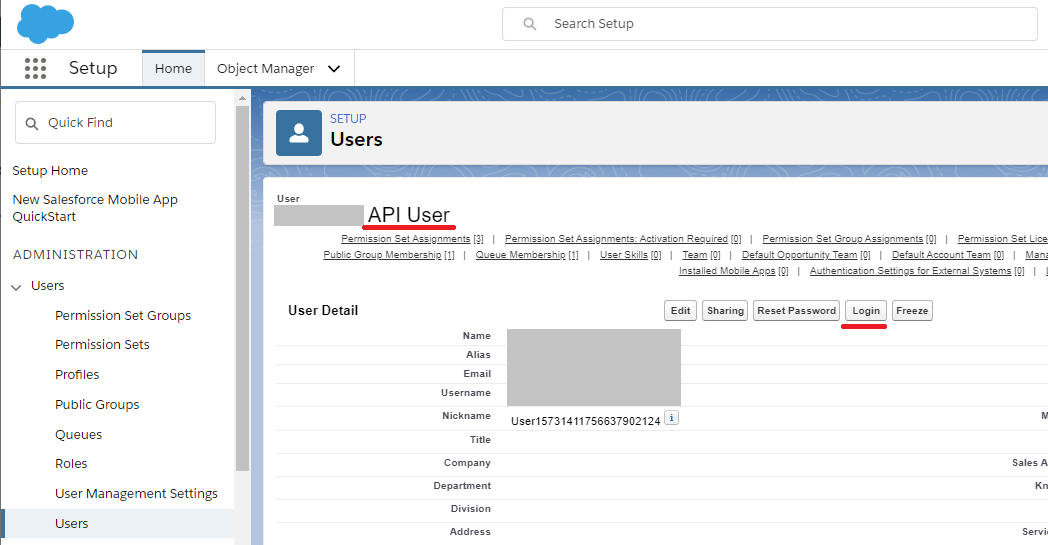
2. Go to My Settings from the User icon.
3. Reset the Security Token, which will email support@refocusai.com with the security token.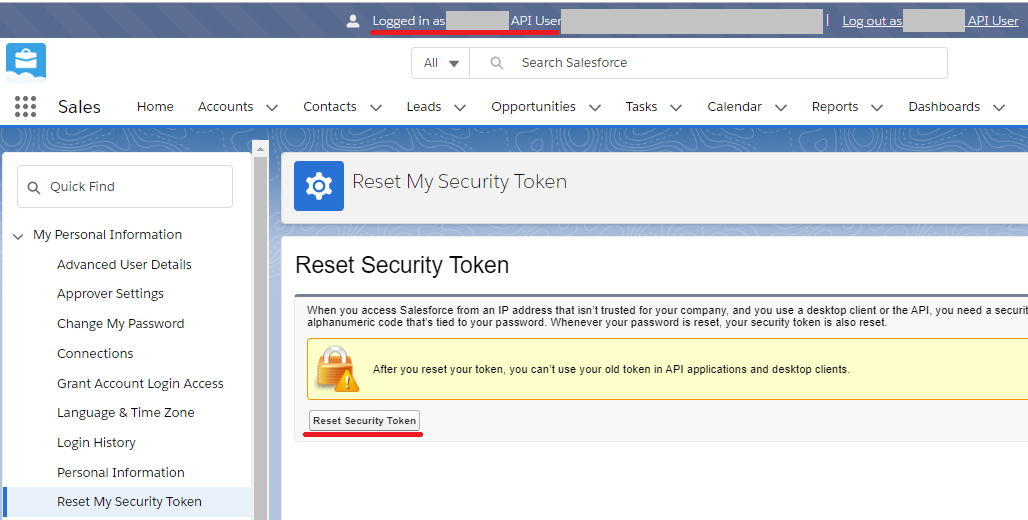
4. Log off.
This will send the token to the user's email address and is the final step of provisioning API access.
### **Step 3**
Once you have completed these steps, forward your onboarding specialist the following:
- API URL (connection string)
- Consumer Key
- Consumer Secret
- Callback URL
### **Step 4**
Now that data can be accessed through the API. There needs to be a place to put your insights back into Salesforce. This requires creating a custom object and specific fields.
To create custom objects, please look at this step-by-guide and follow the steps ([link to instructions](https://www.tutorialspoint.com/salesforce/salesforce_custom_objects.htm)).
1. Please call the custom object: Policy\_Cancellation\_Prediction\_c
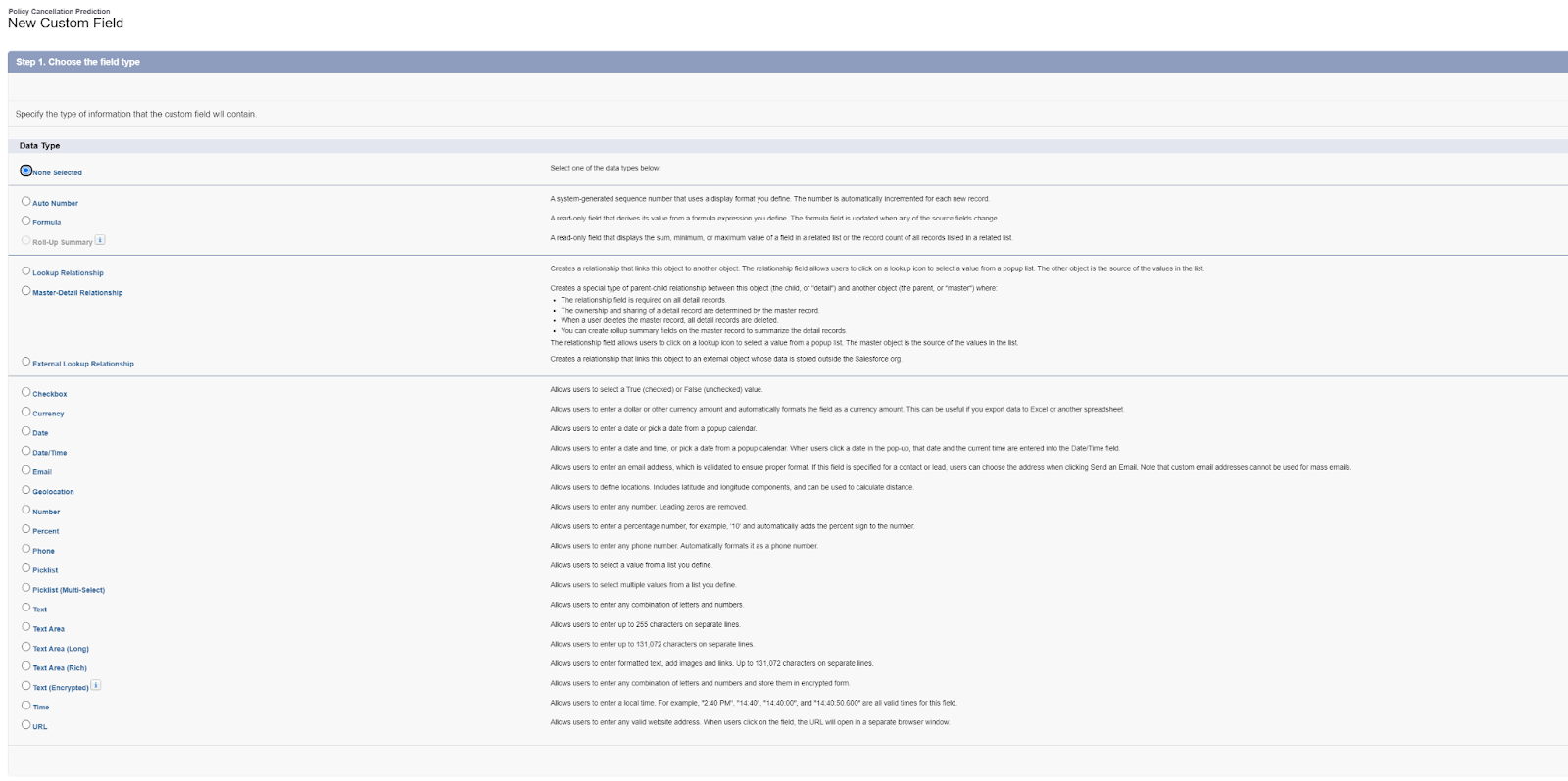
Once the object is created, please go to the guide's 'Steps to Create Salesforce Custom Fields' and create the following four fields. After the field name, you'll see the required data type to select:
1. Policy\_c: Text
2. Predicted\_Cancel\_c: Checkbox
3. Confidence\_c: Number
4. Prediction\_Date\_c: Datetime
Once the object and fields are created, please confirm that the API user you created can access these items.
💡 Salesforce only allows single underscores. You will get an error message if the field name contains two consecutive underscores.
💡If you have any questions during this process, [open a support ticket](https://share.hsforms.com/1cKYQNvogQa6mk6faCaNm2Q4sbg6).
- [Onboarding](https://knowledge.refocusai.com/onboarding?hsLang=en#main-content)
- [Start Here](https://knowledge.refocusai.com/onboarding?hsLang=en#start-here)
- [Set up Carrier Access & MFA Forwarding](https://knowledge.refocusai.com/onboarding?hsLang=en#set-up-carrier-access-mfa-forwarding)
- [Account Monitoring](https://knowledge.refocusai.com/onboarding?hsLang=en#account-monitoring)
- [Remarketing](https://knowledge.refocusai.com/onboarding?hsLang=en#remarketing)
- [Data Enrichment](https://knowledge.refocusai.com/onboarding?hsLang=en#data-enrichment)
- [Risk Engineering](https://knowledge.refocusai.com/onboarding?hsLang=en#risk-engineering)
- [Installing & Using Bridge (Browser Extension)](https://knowledge.refocusai.com/onboarding?hsLang=en#installing-using-bridge-browser-extension)
- [Renewal Hub](https://knowledge.refocusai.com/onboarding?hsLang=en#renewal-hub)
- [User Access and Permissions](https://knowledge.refocusai.com/onboarding?hsLang=en#user-access-and-permissions)
- [Integrations](https://knowledge.refocusai.com/integrations?hsLang=en#main-content)
- [General](https://knowledge.refocusai.com/integrations?hsLang=en#general)
- [Jetfile](https://knowledge.refocusai.com/integrations?hsLang=en#jetfile)
- [AgencyZoom](https://knowledge.refocusai.com/integrations?hsLang=en#agencyzoom)
- [AMS360](https://knowledge.refocusai.com/integrations?hsLang=en#ams360)
- [EZLynx](https://knowledge.refocusai.com/integrations?hsLang=en#ezlynx)
- [Hawksoft](https://knowledge.refocusai.com/integrations?hsLang=en#hawksoft)
- [Salesforce](https://knowledge.refocusai.com/integrations?hsLang=en#salesforce)
- [Applied Epic](https://knowledge.refocusai.com/integrations?hsLang=en#applied-epic)
- [QQ Catalyst](https://knowledge.refocusai.com/integrations?hsLang=en#qq-catalyst)
- [MomentumAMP](https://knowledge.refocusai.com/integrations?hsLang=en#momentumamp)
- [Best Practices Guide](https://knowledge.refocusai.com/best-practices-guide?hsLang=en)
- [Release Notes](https://knowledge.refocusai.com/release-notes?hsLang=en#main-content)
- [2025](https://knowledge.refocusai.com/release-notes?hsLang=en#2025)
- [2026](https://knowledge.refocusai.com/release-notes?hsLang=en#2026)
- [Product Roadmap](https://knowledge.refocusai.com/release-notes?hsLang=en#product-roadmap)
[](http://refocusai.com)
[mailto:support@refocusai.com](mailto:support@refocusai.com)
Copyright © 2025, ReFocus AI Inc.