
✅ Who should use this
-
Virtual Assistants (VAs)
-
Customer Service Representatives (CSRs)
-
Account Executives (AEs)
🟧 When to use it
➡️ You received a quote from a carrier outside of ReFocus (carrier portal, underwriter email, phone quote, etc.)
➡️ You want that quote available in ReFocus for side-by-side comparison
➡️ You want to include it in the automatic proposal generator for presentation to the insured
📍 Where to find it
➡️ Remarketing → Detailed Quote (available for every line of business)
➡️ Click + Add Quote (top-right of the screen)

➕ How to add a manual quote
-
Open the account’s Remarketing record
-
Navigate to the Detailed Quote screen for the line of business you’re working on
-
Click + Add Quote
-
Enter the required fields:
-
Carrier*
-
Total Premium*
-
-
(Optional) Fill in any additional structured fields shown (these vary by line of business)
-
Click Save
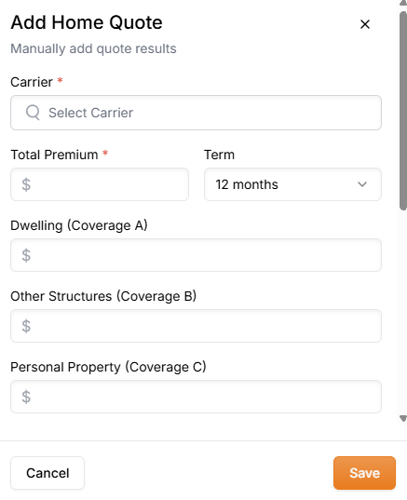
✅ The manual quote will appear in the quote results list.
🧾 Include the manual quote in the proposal generator
Once saved, the manual quote can be included in the automatic proposal generator.
➡️ Open the proposal generator and select the manual quote from the available quote options to include it in the insured-facing proposal.
✏️ Edit or delete a manual quote
Need to make a correction? No problem.
➡️ In the quote results list, use the quote row actions (often ⋯) to:
-
Edit the manual quote
-
Delete the manual quote
🧩 How manual quotes interact with automated quotes
-
Manual quotes do not override automated quotes.
-
They are added alongside automated results, so your team can compare all available options in one place.
-
Notes are not available today—inputs are structured only.
💡 Best practices for high-quality manual quotes
➡️ Keep data consistent (clean, standardized entries reduce errors and rework).
➡️ Use a repeatable workflow across team members to keep quoting efficient and consistent.
➡️ Apply least-privilege access so only users who need to add/edit quotes can do so.
➡️ Present simply: insured-facing proposals land best when they focus on clear differences and plain-language tradeoffs.