---
title: "Troubleshooting: Carrier invite email didn’t reach ReFocus after creating dedicated credentials"
description: Create dedicated ReFocus carrier credentials but the activation email didn’t reach ReFocus? Follow this step-by-step guide to verify the carrier user, fix the ReFocus invite email, resend the invitation, and complete setup fast.
---
[Skip to content](https://knowledge.refocusai.com/troubleshooting-carrier-invite-email-didnt-reach-refocus-after-creating-dedicated-credentials#main-content)
[More support](https://knowledge.refocusai.com/kb-tickets/new?hsLang=en) [Customer portal](https://knowledge.refocusai.com/support?hsLang=en)

- [ReFocus AI Website](https://refocusai.com)
- [Blog](https://blog.refocusai.com)
Open main navigation
Close main navigation
- [ReFocus AI Website](https://refocusai.com)
- [Blog](https://blog.refocusai.com)
- [More support](https://knowledge.refocusai.com/kb-tickets/new)
- [Customer portal](https://knowledge.refocusai.com/support)
How can we help you?
- There are no suggestions because the search field is empty.
1. [Knowledge Center](https://knowledge.refocusai.com/?hsLang=en)
2. [Onboarding](https://knowledge.refocusai.com/onboarding?hsLang=en)
3. [Set up Carrier Access & MFA Forwarding](https://knowledge.refocusai.com/onboarding?hsLang=en#set-up-carrier-access-mfa-forwarding)
December 30, 2025
# Troubleshooting: Carrier invite email didn’t reach ReFocus after creating dedicated credentials
## After you create a dedicated ReFocus user on a carrier website, the carrier typically sends an activation/registration invite email. That invite should be delivered to the ReFocus team (to the ReFocus email address you entered for that carrier user) — not to your personal/customer inbox.
Sometimes those invite emails don’t come through. When that happens, ReFocus can still **see the credentials you entered** in the portal, but we **can’t complete setup** until the carrier user is fully activated.
This article explains what happens, why we may reach out, and exactly what we need you to do to reset the invite to the correct ReFocus email (for example: **agencyinsurance-mfa@refocusai.com**).
---
#### ✅ What ReFocus can (and can’t) see
➡️ **We can see** the credentials you entered on the **Carrier Settings** page in the ReFocus web portal.
➡️ **We can’t complete setup** until the carrier user is activated via the carrier’s invite flow.
➡️ **We should receive** the carrier’s invite email at the **ReFocus email address provided on the carrier setting page** (example: **agencyinsurance-mfa@refocusai.com**).
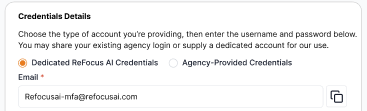
If we don’t receive the invite email, it usually means the carrier user is:
- Not created successfully, **or**
- Created but invite was never sent / got stuck, **or**
- Created with the wrong email, **or**
- Still pending and needs the invite re-sent from the carrier portal
---
#### Why we may reach out to you
➡️ If we don’t receive the carrier’s activation/registration email, we’ll contact you and ask you to **verify the carrier-side user record** and **reset/resend the invite** to the correct ReFocus email.
This is normal — and it’s usually quick to fix once the invite is reissued.
---
#### Step-by-step: Reset the invite to the correct ReFocus email
### 1) Confirm which ReFocus email should receive the invite
➡️ Use the **exact ReFocus email provided by your ReFocus team** for this carrier.
Example:
- **agencyinsurance-mfa@refocusai.com**
⚠️ Important: The invite must go to the *same* ReFocus email that was entered on the carrier user profile. Small typos can prevent delivery.
---
### 2) Log into the carrier site and find “Manage Users”
➡️ Log into the carrier website with the admin-enabled account that can manage agency users.
Then navigate to a section like:
- **Manage Users**
- **User Administration**
- **Agency Users**
- **Admin Tools**
- **Security / Access**
---
### 3) Verify the ReFocus user exists — and the email is correct
➡️ Search for the ReFocus user you created and confirm:
- **Email address** matches exactly (example: **agencyinsurance-mfa@refocusai.com**)
- **Status** is visible (common statuses: *Invited*, *Pending*, *Unregistered*, *Active*)
**If the user does NOT exist:**
➡️ Create the user again on the carrier website and make sure the email is the correct ReFocus email.
**If the user exists but the email is wrong:**
➡️ Update the email to the correct ReFocus email (if the carrier allows edits).
➡️ If the carrier does **not** allow edits, you may need to **disable/delete** the user and **re-create** it with the correct email.
---
### 4) Resend the carrier invitation to ReFocus
If the user exists but isn’t fully activated:
➡️ Click the carrier option to **Resend Invitation / Resend Activation Email**.
Common labels:
- “Resend Invite”
- “Resend Activation”
- “Send Registration Email”
- “Re-issue Invitation”
➡️ After resending, let ReFocus know you’ve done it so we can watch for the email on our side.
---
#### If the invite still doesn’t arrive to ReFocus
➡️ Confirm again that the carrier user profile email exactly matches the ReFocus email provided.
➡️ Resend the invite one more time from the carrier portal.
➡️ If your carrier portal shows an “invite sent” timestamp, take a screenshot (optional but helpful).
✅ In most cases, the issue is either:
- A typo in the email address, or
- The invite is stuck and needs a resend from the carrier portal
---
#### What to send ReFocus so we can finish setup
Once you’ve checked/reset the invite:
➡️ Reply to the ReFocus team with:
- Carrier name
- The ReFocus email used on the carrier user (example: **agencyinsurance-mfa@refocusai.com**)
- The current user status (Invited/Pending/Active)
- Confirmation you clicked **Resend Invite** (and roughly when)
---
#### Quick checklist
➡️ Confirm correct ReFocus invite email (example: **agencyinsurance-mfa@refocusai.com**)
➡️ Carrier portal → **Manage Users**
➡️ Verify ReFocus user exists
➡️ Verify email matches exactly
➡️ Resend invitation / activation email
➡️ Notify ReFocus once sent so we can complete setup
- [Onboarding](https://knowledge.refocusai.com/onboarding?hsLang=en#main-content)
- [Start Here](https://knowledge.refocusai.com/onboarding?hsLang=en#start-here)
- [Set up Carrier Access & MFA Forwarding](https://knowledge.refocusai.com/onboarding?hsLang=en#set-up-carrier-access-mfa-forwarding)
- [Account Monitoring](https://knowledge.refocusai.com/onboarding?hsLang=en#account-monitoring)
- [Remarketing](https://knowledge.refocusai.com/onboarding?hsLang=en#remarketing)
- [Data Enrichment](https://knowledge.refocusai.com/onboarding?hsLang=en#data-enrichment)
- [Risk Engineering](https://knowledge.refocusai.com/onboarding?hsLang=en#risk-engineering)
- [Installing & Using Bridge (Browser Extension)](https://knowledge.refocusai.com/onboarding?hsLang=en#installing-using-bridge-browser-extension)
- [Renewal Hub](https://knowledge.refocusai.com/onboarding?hsLang=en#renewal-hub)
- [User Access and Permissions](https://knowledge.refocusai.com/onboarding?hsLang=en#user-access-and-permissions)
- [Integrations](https://knowledge.refocusai.com/integrations?hsLang=en#main-content)
- [General](https://knowledge.refocusai.com/integrations?hsLang=en#general)
- [Jetfile](https://knowledge.refocusai.com/integrations?hsLang=en#jetfile)
- [AgencyZoom](https://knowledge.refocusai.com/integrations?hsLang=en#agencyzoom)
- [AMS360](https://knowledge.refocusai.com/integrations?hsLang=en#ams360)
- [EZLynx](https://knowledge.refocusai.com/integrations?hsLang=en#ezlynx)
- [Hawksoft](https://knowledge.refocusai.com/integrations?hsLang=en#hawksoft)
- [Salesforce](https://knowledge.refocusai.com/integrations?hsLang=en#salesforce)
- [Applied Epic](https://knowledge.refocusai.com/integrations?hsLang=en#applied-epic)
- [QQ Catalyst](https://knowledge.refocusai.com/integrations?hsLang=en#qq-catalyst)
- [MomentumAMP](https://knowledge.refocusai.com/integrations?hsLang=en#momentumamp)
- [Best Practices Guide](https://knowledge.refocusai.com/best-practices-guide?hsLang=en)
- [Release Notes](https://knowledge.refocusai.com/release-notes?hsLang=en#main-content)
- [2025](https://knowledge.refocusai.com/release-notes?hsLang=en#2025)
- [2026](https://knowledge.refocusai.com/release-notes?hsLang=en#2026)
- [Product Roadmap](https://knowledge.refocusai.com/release-notes?hsLang=en#product-roadmap)
[](http://refocusai.com)
[mailto:support@refocusai.com](mailto:support@refocusai.com)
Copyright © 2025, ReFocus AI Inc.