---
title: Using Data Enrichment
description: Data Enrichment increases quote success by resolving missing or incomplete AMS data before carrier requests are sent.
---
[Skip to content](https://knowledge.refocusai.com/using-data-enrichment#main-content)
[More support](https://knowledge.refocusai.com/kb-tickets/new?hsLang=en) [Customer portal](https://knowledge.refocusai.com/support?hsLang=en)

- [ReFocus AI Website](https://refocusai.com)
- [Blog](https://blog.refocusai.com)
Open main navigation
Close main navigation
- [ReFocus AI Website](https://refocusai.com)
- [Blog](https://blog.refocusai.com)
- [More support](https://knowledge.refocusai.com/kb-tickets/new)
- [Customer portal](https://knowledge.refocusai.com/support)
How can we help you?
- There are no suggestions because the search field is empty.
1. [Knowledge Center](https://knowledge.refocusai.com/?hsLang=en)
2. [Onboarding](https://knowledge.refocusai.com/onboarding?hsLang=en)
3. [Data Enrichment](https://knowledge.refocusai.com/onboarding?hsLang=en#data-enrichment)
February 23, 2026
# Using Data Enrichment
## Data Enrichment helps increase remarketing quote success by automatically resolving missing or incomplete client data before carrier quoting begins. When enabled, ReFocus AI checks for common data gaps (especially across Home and Auto) and sources missing details from trusted third-party providers so carrier quote requests have the information they need.
### **Why this matters**
When ReFocus AI pulls client data from your AMS for remarketing, you may encounter:
- Missing required policy or risk details
- Incomplete or improperly formatted data
- Carrier quote failures due to insufficient information
These issues can reduce quote retrieval rates and create extra manual cleanup.
✅ **Data Enrichment helps by:**
- Improving quote success rates
- Producing cleaner, more complete policy data
- Reducing manual intervention
- Increasing overall remarketing performance
---
### **Complimentary credits (included)**
Every customer receives:
🎁 **200 Free Data Enrichment Credits**
- Automatically available after enabling Data Enrichment
- **No payment method required** to start
- Great for testing and validating ROI
- Free credits are used **before** any paid credits
➡️ You can monitor remaining free credits from the **Data Enrichment Billing Overview** page.
---
### Key features
- **Real-time policy enrichment** (before quoting begins)
- **Multiple data sources** (Home + Auto)
- **Smart credit system** (free → prepaid → pay-as-you-go)
- **Usage analytics**
- **Flexible billing options**
- **200 complimentary credits included**
---
### **How credits work**
**Pricing:** `1 credit = $1 USD`
Credits are deducted **only when enrichment runs** (after you confirm and start the enrichment process).
#### **Credit usage order**
1. **Free credits** (200 starter credits)
2. **Prepaid credits** (if purchased)
3. **Pay-as-you-go billing**
✅ You will not be charged until your free credits are fully consumed.
---
### **Enable and configure Data Enrichment**
💡Before using Data Enrichment in remarketing, you must enable and configure it.
### Step 1: Navigate to Data Enrichment settings
➡️ Log in to ReFocus AI
➡️ Click **Settings** in the left navigation
➡️ In **Core Settings**, select **Data Enrichment**
You’ll see an overview pop-up explaining:
- What Data Enrichment does
- Key features
- Billing structure
- 200 complimentary starter credits
### Step 2: Accept and enable
➡️ Review the billing acknowledgment section
➡️ Click **Accept and Enable Data Enrichment**
---
### **Configure billing**
After enabling, you’ll land on the **Data Enrichment Settings** page.
#### **Billing overview (top of page)**
You’ll see:
- Remaining **free credits**
- **Purchased credits** (if applicable)
- **Pay-as-you-go** status
---
### **Billing options**
#### **Option 1: Prepaid credits (recommended for volume)**
Best for teams running remarketing frequently.
✅ Benefits:
- Purchase credits in advance
- Save **~30%** compared to pay-as-you-go
- Predictable spend for higher volume
➡️ To purchase:
1. Click **Buy Credits**
2. Review available credit bundles
3. Click **Continue to Payment**
4. Enter credit card details
5. Complete purchase
#### **Option 2: Pay-as-you-go**
Best for light or occasional usage.
✅ Benefits:
- No upfront purchase
- Credits deducted per enrichment run
⚠️ Notes:
- Credit card required on file
- Charges occur **only after** free credits are exhausted
---
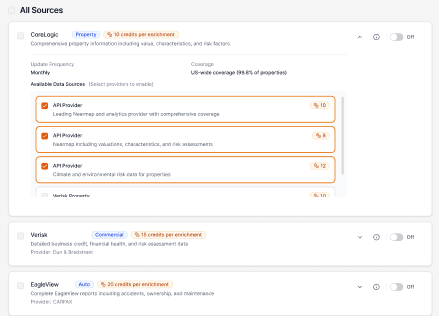
### **Select data sources**
Scroll to **Data Enrichment Sources**.
Sources are organized by:
- **Property (Home)**
- **Auto**
➡️ You can:
- Toggle individual sources **ON/OFF**
- Click **Select All Sources** to enable everything at once
✅ Only **enabled** sources will be used during remarketing enrichment.
---
### **Use Data Enrichment during remarketing**
Once configured, Data Enrichment becomes part of the standard remarketing workflow.
#### **Step 1: Start remarketing**
➡️ Click **Remarkets** in the left navigation
➡️ Select the clients you want to remarket
➡️ Click **Start Remarket**
#### **Step 2: Select carriers**
You’ll select carriers for:
- **Home**
- **Auto**
(based on the selected policies)
➡️ Click **Enrichment** to proceed.
#### **Step 3: Review enrichment details**
You’ll be taken to the **Data Enrichment** screen showing:
- Clients requiring enrichment
- Number of credits to be used
- Remaining free credits
- Selected carriers
- Applicable data sources
➡️ Click **Review and Confirm**
#### **Step 4: Final confirmation**
You’ll see a final summary including:
- Selected policies
- Selected carriers
- Data sources being used
- Total enrichment credit cost
- Whether **free or paid credits** will be applied
➡️ Click **Finish**
This initiates:
- Data enrichment
- Carrier quote retrieval
- The standard remarketing process
---
### **Best practices**
- ✅ **Start small:** Use the 200 free credits to trial enrichment on a subset of accounts.
- ✅ **Enable only what you need:** Turn on the sources most relevant to your book of business to control usage.
- ✅ **Watch the confirmation screen:** The “Review and Confirm” step is the best place to validate estimated credits before running.
- ✅ **Monitor outcomes:** Use **Usage Analytics** to compare quote success rates with and without enrichment.
---
### **Troubleshooting**
**Prompted to add a payment method**
- This happens when **free credits are exhausted,** and you don’t have prepaid credits available.
**No enrichment occurs during a run**
- Confirm at least one data source is toggled **ON** in **Settings → Data Enrichment**.
**Credit usage seems higher than expected**
- Review which sources are enabled (Home vs Auto) and confirm how many clients require enrichment on the review screen.
---
### **Frequently Asked Questions**
**Q: Do I need to enter payment information to use the 200 free credits?**
A: No. You can use all 200 free credits before adding a payment method.
**Q: What happens after I use the 200 free credits?**
A: If no prepaid credits are available, the system will prompt you to add a payment method before continuing.
**Q: Is enrichment mandatory?**
A No. It is optional, but strongly recommended to improve quote performance.
**Q: Can I disable it later?**
A: Yes. You can toggle data sources off at any time.
**Q: When are credits deducted?**
A: Credits are deducted only after you confirm and start the enrichment process.
**Q: What happens if data enrichment fails or no data is found?**
A: Credits for failed enrichments, or the rare situation where no data is found, will be credited back.
---
### **Summary**
Data Enrichment increases quote success by resolving missing or incomplete AMS data **before** carrier requests are sent. Every customer receives **200 complimentary credits** to test the feature risk-free and evaluate its impact on remarketing performance.
➡️ Need help? Contact **ReFocus AI Support** through your standard support channel (in-app support or your assigned CSM).
- [Onboarding](https://knowledge.refocusai.com/onboarding?hsLang=en#main-content)
- [Start Here](https://knowledge.refocusai.com/onboarding?hsLang=en#start-here)
- [Set up Carrier Access & MFA Forwarding](https://knowledge.refocusai.com/onboarding?hsLang=en#set-up-carrier-access-mfa-forwarding)
- [Account Monitoring](https://knowledge.refocusai.com/onboarding?hsLang=en#account-monitoring)
- [Remarketing](https://knowledge.refocusai.com/onboarding?hsLang=en#remarketing)
- [Data Enrichment](https://knowledge.refocusai.com/onboarding?hsLang=en#data-enrichment)
- [Risk Engineering](https://knowledge.refocusai.com/onboarding?hsLang=en#risk-engineering)
- [Installing & Using Bridge (Browser Extension)](https://knowledge.refocusai.com/onboarding?hsLang=en#installing-using-bridge-browser-extension)
- [Renewal Hub](https://knowledge.refocusai.com/onboarding?hsLang=en#renewal-hub)
- [User Access and Permissions](https://knowledge.refocusai.com/onboarding?hsLang=en#user-access-and-permissions)
- [Integrations](https://knowledge.refocusai.com/integrations?hsLang=en#main-content)
- [General](https://knowledge.refocusai.com/integrations?hsLang=en#general)
- [Jetfile](https://knowledge.refocusai.com/integrations?hsLang=en#jetfile)
- [AgencyZoom](https://knowledge.refocusai.com/integrations?hsLang=en#agencyzoom)
- [AMS360](https://knowledge.refocusai.com/integrations?hsLang=en#ams360)
- [EZLynx](https://knowledge.refocusai.com/integrations?hsLang=en#ezlynx)
- [Hawksoft](https://knowledge.refocusai.com/integrations?hsLang=en#hawksoft)
- [Salesforce](https://knowledge.refocusai.com/integrations?hsLang=en#salesforce)
- [Applied Epic](https://knowledge.refocusai.com/integrations?hsLang=en#applied-epic)
- [QQ Catalyst](https://knowledge.refocusai.com/integrations?hsLang=en#qq-catalyst)
- [MomentumAMP](https://knowledge.refocusai.com/integrations?hsLang=en#momentumamp)
- [Best Practices Guide](https://knowledge.refocusai.com/best-practices-guide?hsLang=en)
- [Release Notes](https://knowledge.refocusai.com/release-notes?hsLang=en#main-content)
- [2025](https://knowledge.refocusai.com/release-notes?hsLang=en#2025)
- [2026](https://knowledge.refocusai.com/release-notes?hsLang=en#2026)
- [Product Roadmap](https://knowledge.refocusai.com/release-notes?hsLang=en#product-roadmap)
[](http://refocusai.com)
[mailto:support@refocusai.com](mailto:support@refocusai.com)
Copyright © 2025, ReFocus AI Inc.