
What is New
Introducing Roles and Permissions
We are thrilled to announce the release of Role-Based Access Control, a major milestone for the ReFocus AI platform.
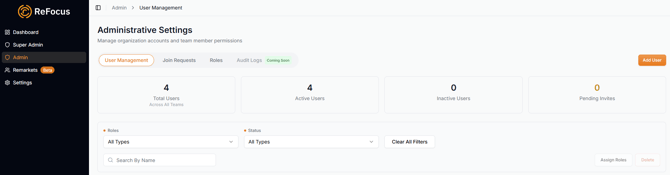
As agencies grow, different team members need different levels of access. Until now, everyone within an agency has had access to the same features and settings. With this release, agency administrators can control what each user can see and do within the platform.
By default, every user now has one of two roles:
| Admin |
Admins have full access to the platform, including users, billing, integrations, carrier credentials, settings, and workflow management. |
|---|---|
| User |
Users have access to daily workflow activities, such as remarketing, quotes, and proposals, depending on the permissions assigned by their administrator. |
New Organizational Controls
Agency administrators can now configure access for each team member, including:
- Access to the entire book of business or only accounts where they are the Agent or CSR of record
- Access to optional features such as Data Enrichment and Automations
- Whether a user utilizes shared carrier credentials or their own dedicated credentials
When a user attempts to access something they are not authorized to use, the platform clearly explains why access is restricted and what action is needed.
Easy Transition for Existing Customers
There is no immediate change for existing users.
All current users will retain their existing access. Agency administrators can begin configuring roles and permissions whenever they are ready through the Settings section of the platform.
Powerful Administrative Tools
This release also includes several powerful tools for administrators:
- Invite and manage users from a single screen
- View a simple summary of each user's permissions
- Preview the platform exactly as a specific user sees it before applying changes
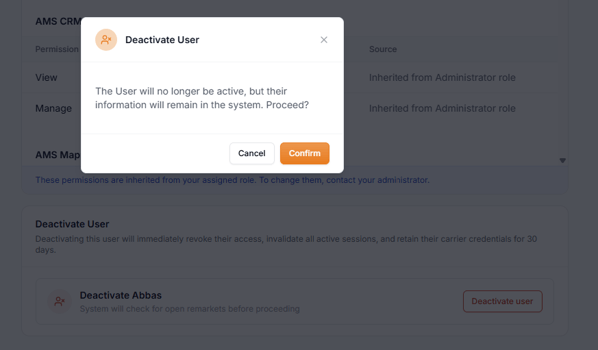
- Deactivate users and reassign their open work in a single step
Enhanced Security and Auditability (Coming Soon)
Every permission change, role assignment, user deactivation, and sensitive workflow action is now automatically recorded in the audit log with a timestamp and the user who performed the action.
Audit records cannot be modified or deleted, providing a complete history of administrative activity.
GEICO Auto Now Available
We are excited to announce that GEICO Auto is now available on the ReFocus AI platform.
Agencies can now retrieve and compare GEICO quotes directly through the platform, expanding carrier coverage and providing more options during the remarketing process.
To start using Geico, go to Settings > Carriers and add it to your carrier list.
Coming Soon
Renewal Hub
We have been working on something that will fundamentally improve how agencies manage renewals in ReFocus AI.
It is called Renewal Hub.
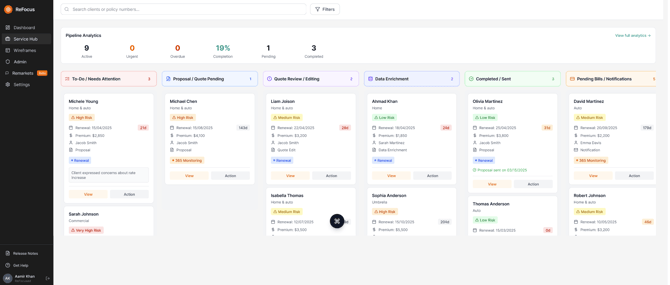
We want to give you an early preview and will be sharing more information soon. Renewal Hub is a ground-up design that helps agencies manage renewal activity more effectively and efficiently through a single experience.
Right now, renewals are tracked in disconnected, fragmented ways: some parts of the process are tracked in the AMS, some automation may be triggered from a CRM, and a manual spreadsheet for admin visibility and prioritization.
We’re excited to share more about this in the coming weeks!
Enhancements and Bug Fixes
HawkSoft Data Quality Improvements
We continue to improve how data is retrieved from HawkSoft by refining the extraction of primary insured and household member information.
We resolved several issues reported by customers, including:
- Some address fields were formatted incorrectly after extraction from the AMS
- Some business rules were not being applied to satisfy the carrier's required fields
- The Foundation dropdown on the Final Review screen was opening in the wrong direction
Known Issues
We are currently working on the following items:
- Incorrect ZIP code validation error in Bristol West
- The EZLynx tile is not clickable on the onboarding screen