
What is New
Advanced Filtering on the Remarketing List Page
We have introduced powerful filtering capabilities on the remarketing list page. Users can now search for policies using criteria such as:
- Policy Holder Name
- Carrier Name
- Policy Type
- Expiration Date
- Premium
- Agent Name and CSR Name
.png?width=553&height=250&name=image%20(6).png)
These filters help insurance agents quickly identify policies that meet specific conditions and prioritize which ones to remarket. Users can also hide filters, clear filters, and add or remove columns on the list page, providing a high level of personalization.
Renewal Premium Now Populating [MVP Feature Release]
Starting this Thursday, the renewal offer premium alongside the current policy premium for EZLynx, and AMS360. The percentage and dollar difference between the two values will be automatically calculated and displayed on the remarketing list page. This makes it easier for agents to quickly identify policies with significant premium increases and decided which ones should be remarketed.
MVP Feature Feedback: In an effort to make highly requested features available as quickly as possible, we launch functionality as soon as we can. If you have feedback, or notice an issue, please let us know by opening a support ticket (click here)!
Upcoming Improvement: We are actively adding renewal policy data for Hawksoft, Applied EPIC, MomentumAMP, and QQCatalyst. This functionality will be made available as soon as it's completed.
Coverage Selection Options [New Risk Engineering Setting Available]
Based on customer feedback, users can now choose whether to keep the existing coverages from the incumbent policy or apply the agency default coverages. This provides greater flexibility during the remarketing process.
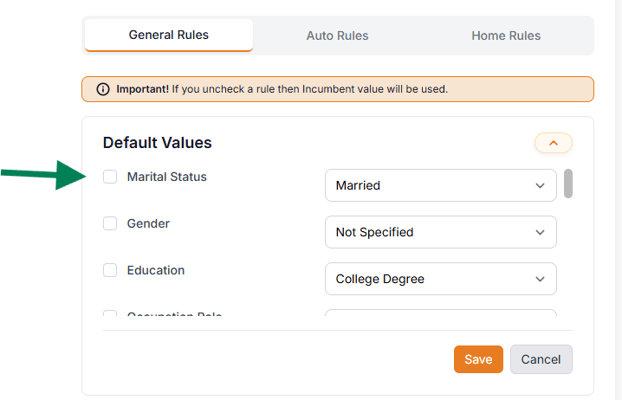
This was introduced to help agencies who quote liability-only auto policies, as well as give more granular control of how risk engineering works.
Bundled Policy Visibility for All AMSs
Bundled policies are now displayed on the remarketing list page for all AMSs, whereas previously only individual policies were shown. This update helps agencies more clearly understand how policies are grouped when reviewing accounts.
Enhancements and Bug Fixes
Consistent Vehicle Ordering Across Quotes
Vehicles are now displayed in a consistent order across all quotes. This makes it much easier for users to compare coverages and pricing for each vehicle across different carriers.
Search Capability in the Audit Tab
We’ve added a search feature in the Audit tab to make it easier to locate specific fields. Users can quickly search for any field they want to review or update, without having to manually scan through the entire list. This makes managing policy data faster and more efficient.
Carrier Configuration for MFA Requirements
Some carriers do not require multi-factor authentication. We’ve added the ability for users to configure those carriers accordingly in the portal. This helps streamline login workflows and prevents unnecessary authentication steps during quote retrieval.
We addressed several issues reported by customers, including:
- Missing fields, such as SSN, not appearing in the Audit tab
- Risk levels not displaying on the Remarketing List page
- Support for alphanumeric organization ID values in EZLynx
Known Issues
We are currently working on the following items:
- The count of accounts on remarketing tabs may not refresh immediately in some cases
- Carrier names in the filters are not fully dynamic yet