---
title: Getting Started with Risk Engineering Rules
description: The Rules section gives your agency control over how the system fills in missing information, interprets unclear AMS fields, and prepares remarkets for your carriers. By customizing your General, Auto, and Home rules, you create a consistent, efficient, and highly accurate quoting experience for your entire team.
---
[Skip to content](https://knowledge.refocusai.com/how-to-setup-risk-engineering-rules#main-content)
[More support](https://knowledge.refocusai.com/kb-tickets/new?hsLang=en) [Customer portal](https://knowledge.refocusai.com/support?hsLang=en)

- [ReFocus AI Website](https://refocusai.com)
- [Blog](https://blog.refocusai.com)
Open main navigation
Close main navigation
- [ReFocus AI Website](https://refocusai.com)
- [Blog](https://blog.refocusai.com)
- [More support](https://knowledge.refocusai.com/kb-tickets/new)
- [Customer portal](https://knowledge.refocusai.com/support)
How can we help you?
- There are no suggestions because the search field is empty.
1. [Knowledge Center](https://knowledge.refocusai.com/?hsLang=en)
2. [Onboarding](https://knowledge.refocusai.com/onboarding?hsLang=en)
3. [Risk Engineering](https://knowledge.refocusai.com/onboarding?hsLang=en#risk-engineering)
May 12, 2026
# Getting Started with Risk Engineering Rules
## Accurate quotes begin with accurate data. However, in the real world, client records may be incomplete, outdated, or inconsistently collected. To help your team generate cleaner, more complete quotes without manual cleanup, you can set default values, general assumptions, and quoting rules directly from the Settings → Risk Engineering Rules tab.
These settings tell the system how to handle missing details, enforce consistent assumptions, and return higher-quality quotes across your carriers, even when AMS data is incomplete.
### **Where to Set Your Rules**
Navigate to: **Settings → Risk Engineering Rules**
****
You’ll see categories based on Line of Business:
- **General Rules**
- **Auto Rules**
- **Home Rules**
💡Additional Lines of Business will be added as ReFocus increases policy types that are supported.
Each category has configurable fields that specify how the system should respond when required data is missing or unclear.
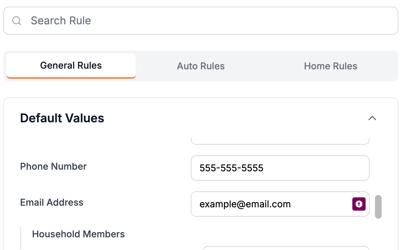
#### **General Rules**
General rules apply across **all** personal lines remarketing. These defaults help standardize how quotes are prepared when key data is absent in your AMS.
Common examples include:
- **Default Phone Number**
For accounts missing phone numbers, the system will insert the default value you specify.
- **Default Email Address**
Prevent quote interruptions by ensuring every household has an email on file.
- **Multi-Policy Discounts**
Specifies which types of quotes are returned for package home and auto, or monoline home and auto quotes.
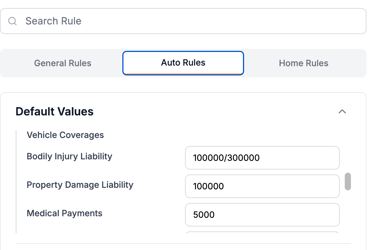
#### **Auto Rules**
Auto-specific assumptions tell the system how to handle gaps in vehicle or driver data. These defaults significantly increase the number of quotes returned without manual edits.
Examples include:
- **Default Vehicle Usage**
(e.g., “Commute” when AMS is blank)
- **Default Annual Mileage**
Allows the system to avoid carrier errors related to missing mileage inputs.
- **Default Towing, Rental, or Comp/Collision Preferences**
Useful when AMS doesn’t specify these coverage choices.
#### ****
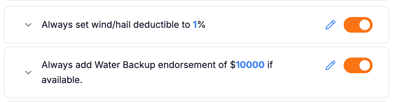
#### **Home Rules**
Home policy assumptions prevent declines and missing-field errors when key dwelling data is incomplete.
Examples include:
- **Water Backup**
This allows you to set water backup limits for all new home quotes
- **Wind/Hail Deductibles**
Ensures carriers receive a valid range if AMS records are missing or incorrect.
#### **Best Practices for Rule Setup**
To get the most out of the Rules settings:
- **Set every field—even if it's uncommon.**
A missing default can cause an unexpected decline from specific carriers.
- **Review your carriers’ quirks.**
If a carrier has known rating sensitivities (roof age, mileage, ADP, etc.), match your defaults accordingly.
- **Update rules quarterly.**
Carriers change guidelines; adjust your defaults to stay aligned.
- **Start conservative, then optimize.**
Use safe assumptions until you review your first few remarkets, then tighten rules for accuracy.
---
### Related articles
For more detailed guidance, see separate articles on:
- [**How to Override or Respect Existing Information in Risk Engineering Rules**](https://knowledge.refocusai.com/override-risk-engineering-rules?hsLang=en)
- [**Understanding the Meets or Exceeds Principle for Risk Engineering**](https://knowledge.refocusai.com/meets-or-exceeds-principle?hsLang=en)
- [**Presets available for Risk Engineering when onboarding**](https://knowledge.refocusai.com/preset-risk-engineering-values?hsLang=en)
- [Onboarding](https://knowledge.refocusai.com/onboarding?hsLang=en#main-content)
- [Start Here](https://knowledge.refocusai.com/onboarding?hsLang=en#start-here)
- [Set up Carrier Access & MFA Forwarding](https://knowledge.refocusai.com/onboarding?hsLang=en#set-up-carrier-access-mfa-forwarding)
- [Account Monitoring](https://knowledge.refocusai.com/onboarding?hsLang=en#account-monitoring)
- [Remarketing](https://knowledge.refocusai.com/onboarding?hsLang=en#remarketing)
- [Data Enrichment](https://knowledge.refocusai.com/onboarding?hsLang=en#data-enrichment)
- [Risk Engineering](https://knowledge.refocusai.com/onboarding?hsLang=en#risk-engineering)
- [Installing & Using Bridge (Browser Extension)](https://knowledge.refocusai.com/onboarding?hsLang=en#installing-using-bridge-browser-extension)
- [Renewal Hub](https://knowledge.refocusai.com/onboarding?hsLang=en#renewal-hub)
- [User Access and Permissions](https://knowledge.refocusai.com/onboarding?hsLang=en#user-access-and-permissions)
- [Integrations](https://knowledge.refocusai.com/integrations?hsLang=en#main-content)
- [General](https://knowledge.refocusai.com/integrations?hsLang=en#general)
- [Jetfile](https://knowledge.refocusai.com/integrations?hsLang=en#jetfile)
- [AgencyZoom](https://knowledge.refocusai.com/integrations?hsLang=en#agencyzoom)
- [AMS360](https://knowledge.refocusai.com/integrations?hsLang=en#ams360)
- [EZLynx](https://knowledge.refocusai.com/integrations?hsLang=en#ezlynx)
- [Hawksoft](https://knowledge.refocusai.com/integrations?hsLang=en#hawksoft)
- [Salesforce](https://knowledge.refocusai.com/integrations?hsLang=en#salesforce)
- [Applied Epic](https://knowledge.refocusai.com/integrations?hsLang=en#applied-epic)
- [QQ Catalyst](https://knowledge.refocusai.com/integrations?hsLang=en#qq-catalyst)
- [MomentumAMP](https://knowledge.refocusai.com/integrations?hsLang=en#momentumamp)
- [Best Practices Guide](https://knowledge.refocusai.com/best-practices-guide?hsLang=en)
- [Release Notes](https://knowledge.refocusai.com/release-notes?hsLang=en#main-content)
- [2025](https://knowledge.refocusai.com/release-notes?hsLang=en#2025)
- [2026](https://knowledge.refocusai.com/release-notes?hsLang=en#2026)
- [Product Roadmap](https://knowledge.refocusai.com/release-notes?hsLang=en#product-roadmap)
[](http://refocusai.com)
[mailto:support@refocusai.com](mailto:support@refocusai.com)
Copyright © 2025, ReFocus AI Inc.