
Overview
Risk Engineering Rules help your agency tell ReFocus how to handle common quoting, renewal, remarketing, and servicing situations.
They are designed to help your team:
- Apply consistent standards across accounts
- Reduce manual decisions during quoting and renewals
- Fill in missing information when appropriate
- Handle customer-specific or carrier-specific exceptions
- Keep workflows flexible without starting from scratch each time
Depending on the line of business or workflow, you may see different rule sections, such as general rules, auto-related rules, home-related rules, or other line-specific defaults and rules.
🏆Good to know: This article is an overview. More detailed setup steps, field-specific behavior, and the “Meets or Exceeds” principle are covered in separate related articles.
What defaults are
Defaults are the baseline values ReFocus can use when information is missing or when your agency wants to apply a standard value.
Think of a default as your agency’s normal starting point.
For example, your agency may want ReFocus to use:
- A standard water backup coverage limit
- A standard deductible
- A standard marital status
- A standard education value
- A standard value for a field that is often missing from the customer record
Defaults are helpful when your agency wants consistency, especially when the same value is commonly used across many accounts.
Example
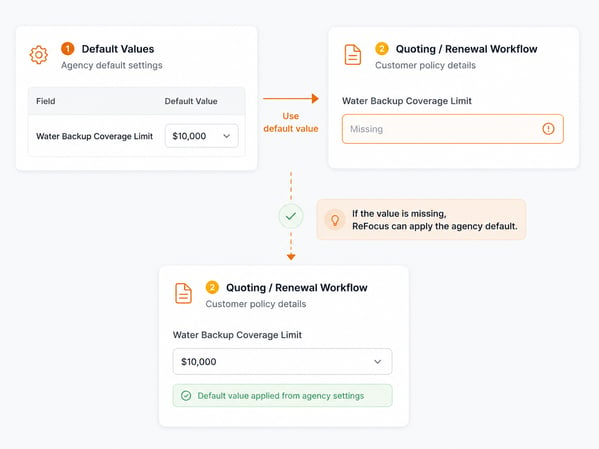
Your agency may set a default water backup limit of $10,000.
When ReFocus is working through a quoting or renewal workflow, and that information is missing, it can use the default value instead of leaving the field blank.
What rules are
Rules are conditional logic that tell ReFocus when to apply certain values based on customer, policy, carrier, line of business, state, or other available information.
A rule is more specific than a default.
Instead of saying, “Use this value all the time,” a rule says, “Use this value when certain conditions are true.”
Example
Your agency may want different deductible defaults by line of business:
- Use a $1,000 deductible for homeowners' policies
- Use a $500 deductible for auto policies
In this case, ReFocus can apply different values depending on the type of policy being quoted or renewed.
Another example
Your agency may create a rule that says:
For homeowners policies, apply a specific water backup coverage limit during quoting.
This helps your team standardize how homeowner's quotes are prepared without needing each user to remember the agency’s preferred value.
What nested rules are
Nested Rules are more specific rules inside a broader rule.
They allow your agency to handle exceptions or more detailed scenarios.
A nested rule is useful when the main rule is usually correct, but there are certain situations where ReFocus should do something different.
Example
Your agency may have a homeowners rule that applies a standard deductible.
Inside that rule, you may add a nested rule for:
- A specific carrier
- A specific state
- A specific property type
- A specific customer or policy condition
For example:
For homeowners policies, use a $1,000 deductible.
But for a specific carrier in Oklahoma, use a $2,500 wind/hail deductible.
The broader rule handles the common situation. The nested rule handles the exception.
How defaults, rules, and nested rules work together
Defaults, rules, and nested rules are designed to work together in layers.
In general:
- Defaults provide the baseline value.
- Rules apply more specific logic when certain conditions are met.
- Nested Rules handle exceptions inside those rules.
This gives your agency both consistency and flexibility.
Simple way to think about it
- Default: “Use this value when we do not have anything more specific.”
- Rule: “Use this value when this condition applies.”
- Nested Rule: “Use this more specific value when this exception applies.”
💡To prevent overlap, each data point in Risk Engineering is connected to either one default or one rule, depending on how that information needs to be used.
Example scenario
Your agency wants to standardize water backup coverage during homeowners' quoting.
Step 1: Add a rule
Your agency creates a rule for homeowners' policies:
For homeowners quotes, use a water backup limit of $25,000.
Now, ReFocus can apply a more specific value when the policy is homeowners.
Step 2: Add a nested rule
Your agency adds a nested rule for a specific carrier or state:
For homeowners policies with a specific carrier in Oklahoma, use a water backup limit of $50,000.
Now, ReFocus can handle the more specific scenario while still keeping the broader homeowners' rule in place.
Best practices
Start with defaults
Use defaults for values your agency commonly applies across many workflows.
Good examples include standard coverage limits, commonly used deductibles, or values your team frequently enters when information is missing.
Use rules for meaningful differences
Create rules when the value should change based on something important, such as:
- Line of business
- Carrier
- State
- Policy type
- Customer or property information
Use nested rules for exceptions
Nested rules are best for situations where a broader rule is usually correct, but a more specific scenario needs different handling.
Avoid creating nested rules unless the exception is clear and repeatable.
Keep rules easy to understand
A good rule should be easy for another team member to read and understand later.
When possible, avoid overcomplicating the setup. Start with the most common workflows first, then add exceptions as needed.
Review rules over time
As carrier requirements, agency standards, or renewal workflows change, your agency should review Risk Engineering Rules periodically to make sure they still reflect current practices.
Quick reference table
| Item | What it means | When to use it | Example |
|---|---|---|---|
| Default | A baseline value ReFocus can use | When information is missing or your agency wants a standard starting value | Default water backup limit of $10,000 |
| Rule | A condition-based instruction | When a value should apply only in certain situations | Use a $1,000 deductible for homeowners' policies |
| Nested Rule | A more specific rule inside a broader rule | When there is an exception to the broader rule | Use a different deductible for a specific carrier, state, or property type |
Related articles
For more detailed guidance, see separate articles on:
- How to Override or Respect Existing Information in Risk Engineering Rules
- Understanding the Meets or Exceeds Principle for Risk Engineering
- Presets available for Risk Engineering when onboarding
Rule of thumb
Use the simplest setup that delivers the right result for your agency.
Defaults set the baseline. Rules handle specific situations. Nested Rules handle exceptions.